策略回调函数
虽然主要策略函数(populate_indicators()、populate_entry_trend()、populate_exit_trend())应以向量化方式使用,并且在回测期间仅调用一次,但回调函数会在"需要时"被调用。
因此,应避免在回调函数中进行繁重计算,以防止操作期间出现延迟。 根据所使用的回调函数类型,它们可能在交易入场/出场时调用,或在交易的整个持续期间调用。
当前可用的回调函数:
bot_start()bot_loop_start()custom_stake_amount()custom_exit()custom_stoploss()custom_roi()custom_entry_price()和custom_exit_price()check_entry_timeout()和check_exit_timeout()confirm_trade_entry()confirm_trade_exit()adjust_trade_position()adjust_entry_price()leverage()order_filled()
回调函数调用顺序
您可以在 bot-basics 中查看回调函数的调用顺序
策略所需的导入
创建策略时,您需要导入必要的模块和类。以下是策略所需的导入:
默认情况下,我们建议将以下导入作为策略的基础导入: 这将涵盖 freqtrade 功能正常运行所需的所有导入。 当然,您可以根据策略需要添加更多导入。
# flake8: noqa: F401
# isort: skip_file
# --- Do not remove these imports ---
import numpy as np
import pandas as pd
from datetime import datetime, timedelta, timezone
from pandas import DataFrame
from typing import Dict, Optional, Union, Tuple

from freqtrade.strategy import (
    IStrategy,
    Trade,
    Order,
    PairLocks,
    informative,  # @informative decorator
    # Hyperopt Parameters
    BooleanParameter,
    CategoricalParameter,
    DecimalParameter,
    IntParameter,
    RealParameter,
    # timeframe helpers
    timeframe_to_minutes,
    timeframe_to_next_date,
    timeframe_to_prev_date,
    # Strategy helper functions
    merge_informative_pair,
    stoploss_from_absolute,
    stoploss_from_open,
)

# --------------------------------
# Add your lib to import here
import talib.abstract as ta
from technical import qtpylib
退出逻辑比较
Freqtrade 允许您的策略使用基于信号或基于回调的函数来实现不同的退出逻辑。 本节旨在比较各种不同的函数,帮助您选择最适合需求的方案。
populate_exit_trend()- 基于主数据框中指标的向量化信号退出逻辑 ✅ 适用场景:基于指标或其他可通过向量化方式计算的数据定义退出信号。 🚫 不适用场景:为每笔独立交易定制退出条件,或需要交易数据才能做出退出决策的情况。custom_exit()- 自定义退出逻辑,将立即完全平仓,在每次机器人循环迭代时为每个未平仓交易调用,直至交易关闭。 ✅ 适用场景:为每笔独立交易指定退出条件(包括使用adjust_trade_position()的任何额外调整订单),或需要交易数据才能做出退出决策(例如使用利润数据退出)。 🚫 不适用场景:希望使用基于向量化指标的数据退出时(改用populate_exit_trend()信号),或作为custom_stoploss()的替代方案,并注意回测中基于速率的退出可能不准确。custom_stoploss()- 自定义追踪止损,在每次迭代时为每个未平仓交易调用,直至交易关闭。此处返回的值也用于交易所止损。
✅ 适用场景:自定义止损逻辑,根据交易数据或其他条件设置动态止损。 🚫 不适用场景:基于特定条件立即退出交易。请使用custom_exit()实现该目的。custom_roi()- 自定义ROI,在每次迭代时为每个未平仓交易调用,直至交易关闭。 ✅ 适用场景:指定最小ROI阈值("止盈"),根据利润或其他条件在交易持续时间内的某个时刻以此ROI水平退出交易。 🚫 不适用场景:基于特定条件立即退出交易。请使用custom_exit()。 🚫 不适用场景:静态ROI。请使用minimal_roi。
机器人启动
一个简单的回调函数,在策略加载时仅调用一次。 可用于执行只需执行一次的操作,并在数据提供器和钱包设置完成后运行。
import requests

class AwesomeStrategy(IStrategy):

    # ... populate_* methods

    def bot_start(self, **kwargs) -> None:
        """
        Called only once after bot instantiation.
        :param **kwargs: Ensure to keep this here so updates to this won't break your strategy.
        """
        if self.config["runmode"].value in ("live", "dry_run"):
            # Assign this to the class by using self.*
            # can then be used by populate_* methods
            self.custom_remote_data = requests.get("https://some_remote_source.example.com")
在超参数优化期间,此函数仅在启动时运行一次。
机器人循环开始
一个简单的回调函数,在实盘/模拟盘模式下每次机器人节流迭代开始时调用一次(大约每5秒一次,除非配置不同),或在回测/超参数优化模式下每根K线调用一次。 可用于执行与交易对无关的计算(适用于所有交易对)、加载外部数据等。
# Default imports
import requests

class AwesomeStrategy(IStrategy):

    # ... populate_* methods

    def bot_loop_start(self, current_time: datetime, **kwargs) -> None:
        """
        Called at the start of the bot iteration (one loop).
        Might be used to perform pair-independent tasks
        (e.g. gather some remote resource for comparison)
        :param current_time: datetime object, containing the current datetime
        :param **kwargs: Ensure to keep this here so updates to this won't break your strategy.
        """
        if self.config["runmode"].value in ("live", "dry_run"):
            # Assign this to the class by using self.*
            # can then be used by populate_* methods
            self.remote_data = requests.get("https://some_remote_source.example.com")
仓位规模管理
在进入交易前调用,使得在下新单时能够管理您的头寸规模。
# Default imports

class AwesomeStrategy(IStrategy):
    def custom_stake_amount(self, pair: str, current_time: datetime, current_rate: float,
                            proposed_stake: float, min_stake: float | None, max_stake: float,
                            leverage: float, entry_tag: str | None, side: str,
                            **kwargs) -> float:

        dataframe, _ = self.dp.get_analyzed_dataframe(pair=pair, timeframe=self.timeframe)
        current_candle = dataframe.iloc[-1].squeeze()

        if current_candle["fastk_rsi_1h"] > current_candle["fastd_rsi_1h"]:
            if self.config["stake_amount"] == "unlimited":
                # Use entire available wallet during favorable conditions when in compounding mode.
                return max_stake
            else:
                # Compound profits during favorable conditions instead of using a static stake.
                return self.wallets.get_total_stake_amount() / self.config["max_open_trades"]

        # Use default stake amount.
        return proposed_stake
如果您的代码引发异常,Freqtrade 将回退到 proposed_stake 值。异常本身将被记录。
Tip
您不_必须_确保 min_stake <= 返回值 <= max_stake。交易将成功,因为返回值会被限制在支持范围内,并且此操作将被记录。
Tip
返回 0 或 None 将阻止交易下单。
自定义退出信号
对每个未平仓交易在每次节流迭代期间(大约每5秒)调用,直到交易平仓。
允许定义自定义退出信号,指示应关闭指定仓位(完全退出)。当我们需要为每笔单独交易自定义退出条件,或者需要交易数据来做出退出决策时,这非常有用。
例如,您可以使用 custom_exit() 实现 1:2 的风险回报率。
不过,不建议使用 custom_exit() 信号来代替止损。在这方面,这是比使用 custom_stoploss() 更差的方法 - 后者还允许您在交易所保留止损。
Note
从此方法返回(非空)string 或 True 等同于在指定时间的蜡烛图上设置退出信号。当退出信号已设置或退出信号被禁用(use_exit_signal=False)时,不会调用此方法。string 的最大长度为 64 个字符。超过此限制将导致消息被截断为 64 个字符。
custom_exit() 将忽略 exit_profit_only,并且除非 use_exit_signal=False,否则将始终被调用,即使有新的入场信号。
以下示例展示了如何根据当前利润使用不同的指标,并退出已持有一天以上的交易:
# Default imports

class AwesomeStrategy(IStrategy):
    def custom_exit(self, pair: str, trade: Trade, current_time: datetime, current_rate: float,
                    current_profit: float, **kwargs):
        dataframe, _ = self.dp.get_analyzed_dataframe(pair, self.timeframe)
        last_candle = dataframe.iloc[-1].squeeze()

        # Above 20% profit, sell when rsi < 80
        if current_profit > 0.2:
            if last_candle["rsi"] < 80:
                return "rsi_below_80"

        # Between 2% and 10%, sell if EMA-long above EMA-short
        if 0.02 < current_profit < 0.1:
            if last_candle["emalong"] > last_candle["emashort"]:
                return "ema_long_below_80"

        # Sell any positions at a loss if they are held for more than one day.
        if current_profit < 0.0 and (current_time - trade.open_date_utc).days >= 1:
            return "unclog"
有关策略回调中数据框使用的更多信息,请参阅数据框访问。
自定义止损
为未平仓交易每次迭代(大约每 5 秒)调用,直到交易关闭。
要启用自定义止损方法,必须在策略对象上设置 use_custom_stoploss=True。
止损价格只能向上移动——如果从 custom_stoploss 返回的止损值会导致止损价格低于先前设置的值,则该值将被忽略。传统的 stoploss 值作为绝对下限,将作为初始止损(在该交易首次调用此方法之前设置),并且仍然是强制性的。
由于自定义止损作为常规的、可变化的止损方式,其行为类似于 trailing_stop——因此因此退出的交易将具有 "trailing_stop_loss" 的退出原因。
该方法必须返回一个止损值(浮点数/数字),作为当前价格的百分比。
例如,如果 current_rate 为 200 美元,则返回 0.02 会将止损价格设置为降低 2%,即 196 美元。
在回测期间,current_rate(和 current_profit)是针对蜡烛图的高点(或做空交易的低点)提供的——而生成的止损价则是针对蜡烛图的低点(或做空交易的高点)进行评估的。
将使用返回值的绝对值(忽略符号),因此返回 0.05 或 -0.05 具有相同的结果,即止损位设定在当前价格下方 5%。
返回 None 将被解释为"不希望更改",并且是当您不希望修改止损位时唯一安全的返回方式。
NaN 和 inf 值被视为无效并将被忽略(等同于 None)。
交易所止损的工作方式类似于 trailing_stop,交易所止损会根据 stoploss_on_exchange_interval 中的配置进行更新(关于交易所止损的更多详情)。
如果您在期货市场交易,请注意止损与杠杆部分,因为从 custom_stoploss 返回的止损值是此交易的风险——而非相对价格变动。
时间使用说明
所有基于时间的计算都应基于 current_time 进行——不鼓励使用 datetime.now() 或 datetime.utcnow(),因为这会破坏回测支持。
追踪止损提示
当使用自定义止损值时,建议禁用 trailing_stop。两者可以协同工作,但您可能会遇到追踪止损抬高价格,而您的自定义函数不希望如此的情况,导致行为冲突。
仓位调整后调整止损
根据您的策略,在调整交易仓位后,您可能需要双向调整止损。
为此,freqtrade 将在订单成交后额外调用一次带有 after_fill=True 参数的函数,这将允许策略向任意方向移动止损(甚至可以扩大止损与当前价格之间的差距,而这在通常情况下是被禁止的)。
向后兼容性
仅当您的 custom_stoploss 函数定义包含 after_fill 参数时,才会进行此调用。
因此,这不会影响(也就不会让)现有运行中的策略感到意外。
自定义止损示例
下一节将展示自定义止损函数可实现的一些示例。 当然,还有更多可能性,所有示例都可以随意组合使用。
通过自定义止损实现追踪止损
要模拟常规的4%追踪止损(在最高达到价格后方追踪4%),您可以使用以下非常简单的方法:
# Default imports

class AwesomeStrategy(IStrategy):

    # ... populate_* methods

    use_custom_stoploss = True

    def custom_stoploss(self, pair: str, trade: Trade, current_time: datetime,
                        current_rate: float, current_profit: float, after_fill: bool,
                        **kwargs) -> float | None:
        """
        Custom stoploss logic, returning the new distance relative to current_rate (as ratio).
        e.g. returning -0.05 would create a stoploss 5% below current_rate.
        The custom stoploss can never be below self.stoploss, which serves as a hard maximum loss.

        For full documentation please go to https://www.freqtrade.io/en/latest/strategy-advanced/

        When not implemented by a strategy, returns the initial stoploss value.
        Only called when use_custom_stoploss is set to True.

        :param pair: Pair that's currently analyzed
        :param trade: trade object.
        :param current_time: datetime object, containing the current datetime
        :param current_rate: Rate, calculated based on pricing settings in exit_pricing.
        :param current_profit: Current profit (as ratio), calculated based on current_rate.
        :param after_fill: True if the stoploss is called after the order was filled.
        :param **kwargs: Ensure to keep this here so updates to this won't break your strategy.
        :return float: New stoploss value, relative to the current_rate
        """
        return -0.04 * trade.leverage
基于时间的追踪止损
前60分钟使用初始止损,之后改为10%追踪止损,2小时(120分钟)后使用5%追踪止损。
# Default imports

class AwesomeStrategy(IStrategy):

    # ... populate_* methods

    use_custom_stoploss = True

    def custom_stoploss(self, pair: str, trade: Trade, current_time: datetime,
                        current_rate: float, current_profit: float, after_fill: bool,
                        **kwargs) -> float | None:

        # Make sure you have the longest interval first - these conditions are evaluated from top to bottom.
        if current_time - timedelta(minutes=120) > trade.open_date_utc:
            return -0.05 * trade.leverage
        elif current_time - timedelta(minutes=60) > trade.open_date_utc:
            return -0.10 * trade.leverage
        return None
支持成交后调整的基于时间追踪止损
在前60分钟使用初始止损,之后改为10%的追踪止损,2小时(120分钟)后使用5%的追踪止损。
如果发生额外订单成交,将止损设置为新开仓价下方-10%(所有入场点的平均值)。
# Default imports

class AwesomeStrategy(IStrategy):

    # ... populate_* methods

    use_custom_stoploss = True

    def custom_stoploss(self, pair: str, trade: Trade, current_time: datetime,
                        current_rate: float, current_profit: float, after_fill: bool,
                        **kwargs) -> float | None:

        if after_fill:
            # After an additional order, start with a stoploss of 10% below the new open rate
            return stoploss_from_open(0.10, current_profit, is_short=trade.is_short, leverage=trade.leverage)
        # Make sure you have the longest interval first - these conditions are evaluated from top to bottom.
        if current_time - timedelta(minutes=120) > trade.open_date_utc:
            return -0.05 * trade.leverage
        elif current_time - timedelta(minutes=60) > trade.open_date_utc:
            return -0.10 * trade.leverage
        return None
不同交易对采用不同止损
根据交易对使用不同的止损值。
本例中,我们将对ETH/BTC和XRP/BTC采用最高价10%的追踪止损,对LTC/BTC采用5%追踪止损,其他所有交易对采用15%追踪止损。
# Default imports

class AwesomeStrategy(IStrategy):

    # ... populate_* methods

    use_custom_stoploss = True

    def custom_stoploss(self, pair: str, trade: Trade, current_time: datetime,
                        current_rate: float, current_profit: float, after_fill: bool,
                        **kwargs) -> float | None:

        if pair in ("ETH/BTC", "XRP/BTC"):
            return -0.10 * trade.leverage
        elif pair in ("LTC/BTC"):
            return -0.05 * trade.leverage
        return -0.15 * trade.leverage
带正偏移的追踪止损
在利润达到4%之前使用初始止损,之后采用当前利润50%的追踪止损(最小值2.5%,最大值5%)。
请注意止损只能向上调整,低于当前止损值的设置将被忽略。
# Default imports

class AwesomeStrategy(IStrategy):

    # ... populate_* methods

    use_custom_stoploss = True

    def custom_stoploss(self, pair: str, trade: Trade, current_time: datetime,
                        current_rate: float, current_profit: float, after_fill: bool,
                        **kwargs) -> float | None:

        if current_profit < 0.04:
            return None # return None to keep using the initial stoploss

        # After reaching the desired offset, allow the stoploss to trail by half the profit
        desired_stoploss = current_profit / 2

        # Use a minimum of 2.5% and a maximum of 5%
        return max(min(desired_stoploss, 0.05), 0.025) * trade.leverage
阶梯式止损
本例不采用持续追踪当前价格的方式,而是根据当前利润设置固定的止损价格水平。
- 在利润达到20%前使用常规止损
- 利润>20%时 - 将止损设置为开仓价上方7%
- 利润>25%时 - 将止损设置为开仓价上方15%
- 利润>40%时 - 将止损设置为开仓价上方25%
# Default imports

class AwesomeStrategy(IStrategy):

    # ... populate_* methods

    use_custom_stoploss = True

    def custom_stoploss(self, pair: str, trade: Trade, current_time: datetime,
                        current_rate: float, current_profit: float, after_fill: bool,
                        **kwargs) -> float | None:

        # evaluate highest to lowest, so that highest possible stop is used
        if current_profit > 0.40:
            return stoploss_from_open(0.25, current_profit, is_short=trade.is_short, leverage=trade.leverage)
        elif current_profit > 0.25:
            return stoploss_from_open(0.15, current_profit, is_short=trade.is_short, leverage=trade.leverage)
        elif current_profit > 0.20:
            return stoploss_from_open(0.07, current_profit, is_short=trade.is_short, leverage=trade.leverage)

        # return maximum stoploss value, keeping current stoploss price unchanged
        return None
使用数据框架指标的定制止损示例
绝对止损值可以从存储在数据帧中的指标推导得出。以下示例使用价格下方的抛物线转向指标作为止损依据。
# Default imports

class AwesomeStrategy(IStrategy):

    def populate_indicators(self, dataframe: DataFrame, metadata: dict) -> DataFrame:
        # <...>
        dataframe["sar"] = ta.SAR(dataframe)

    use_custom_stoploss = True

    def custom_stoploss(self, pair: str, trade: Trade, current_time: datetime,
                        current_rate: float, current_profit: float, after_fill: bool,
                        **kwargs) -> float | None:

        dataframe, _ = self.dp.get_analyzed_dataframe(pair, self.timeframe)
        last_candle = dataframe.iloc[-1].squeeze()

        # Use parabolic sar as absolute stoploss price
        stoploss_price = last_candle["sar"]

        # Convert absolute price to percentage relative to current_rate
        if stoploss_price < current_rate:
            return stoploss_from_absolute(stoploss_price, current_rate, is_short=trade.is_short)

        # return maximum stoploss value, keeping current stoploss price unchanged
        return None
关于策略回调中数据帧使用的更多信息,请参阅数据帧访问。
止损计算的常用辅助函数
相对于开盘价的止损
从custom_stoploss()返回的止损值必须指定相对于current_rate的百分比,但有时您可能希望指定相对于_入场_价格的止损。
stoploss_from_open()是一个辅助函数,用于计算可从custom_stoploss返回的止损值,该值将等同于入场点上方所需的交易利润。
从自定义止损函数返回相对于开盘价的止损
Say the open price was $100, and current_price is $121 (current_profit will be 0.21).
If we want a stop price at 7% above the open price we can call stoploss_from_open(0.07, current_profit, False) which will return 0.1157024793. 11.57% below $121 is $107, which is the same as 7% above $100.
This function will consider leverage - so at 10x leverage, the actual stoploss would be 0.7% above $100 (0.7% * 10x = 7%).
# Default imports

class AwesomeStrategy(IStrategy):

    # ... populate_* methods

    use_custom_stoploss = True

    def custom_stoploss(self, pair: str, trade: Trade, current_time: datetime,
                        current_rate: float, current_profit: float, after_fill: bool,
                        **kwargs) -> float | None:

        # once the profit has risen above 10%, keep the stoploss at 7% above the open price
        if current_profit > 0.10:
            return stoploss_from_open(0.07, current_profit, is_short=trade.is_short, leverage=trade.leverage)

        return 1
Full examples can be found in the Custom stoploss section of the Documentation.
Note
向stoploss_from_open()提供无效输入可能会产生"自定义止损函数未返回有效止损"警告。
当current_profit参数低于指定的open_relative_stop时,可能出现这种情况。此类情况可能在交易平仓
被confirm_trade_exit()方法阻止时发生。通过检查confirm_trade_exit()中的exit_reason来永不阻止止损卖出,
或使用return stoploss_from_open(...) or 1的惯用法,可以在current_profit < open_relative_stop时请求不更改止损,
从而解决警告问题。
基于绝对价格的止损百分比
custom_stoploss() 返回的止损值始终指定相对于 current_rate 的百分比。若要在指定绝对价格水平设置止损,需使用 stop_rate 计算相对于 current_rate 的百分比,使得结果等同于从开盘价指定百分比的效果。
辅助函数 stoploss_from_absolute() 可用于将绝对价格转换为当前价格相对止损值,该值可从 custom_stoploss() 返回。
通过自定义止损函数返回基于绝对价格的止损
If we want to trail a stop price at 2xATR below current price we can call stoploss_from_absolute(current_rate + (side * candle["atr"] * 2), current_rate=current_rate, is_short=trade.is_short, leverage=trade.leverage).
For futures, we need to adjust the direction (up or down), as well as adjust for leverage, since the custom_stoploss callback returns the "risk for this trade" - not the relative price movement.
# Default imports

class AwesomeStrategy(IStrategy):

    use_custom_stoploss = True

    def populate_indicators(self, dataframe: DataFrame, metadata: dict) -> DataFrame:
        dataframe["atr"] = ta.ATR(dataframe, timeperiod=14)
        return dataframe

    def custom_stoploss(self, pair: str, trade: Trade, current_time: datetime,
                        current_rate: float, current_profit: float, after_fill: bool,
                        **kwargs) -> float | None:
        dataframe, _ = self.dp.get_analyzed_dataframe(pair, self.timeframe)
        trade_date = timeframe_to_prev_date(self.timeframe, trade.open_date_utc)
        candle = dataframe.iloc[-1].squeeze()
        side = 1 if trade.is_short else -1
        return stoploss_from_absolute(current_rate + (side * candle["atr"] * 2),
                                      current_rate=current_rate,
                                      is_short=trade.is_short,
                                      leverage=trade.leverage)
自定义 ROI
每次迭代(约每 5 秒)为未平仓交易调用,直至交易平仓。
必须在策略对象上设置 use_custom_roi=True 方可启用自定义 ROI 方法。
此方法允许您为退出交易定义自定义的最小 ROI 阈值,以比率表示(例如 0.05 表示 5% 利润)。若同时定义了 minimal_roi 和 custom_roi,将触发两者中较低的阈值退出。例如,若 minimal_roi 设置为 {"0": 0.10}(0 分钟时 10%)且 custom_roi 返回 0.05,则当利润达到 5% 时将退出交易;若 custom_roi 返回 0.10 且 minimal_roi 设置为 {"0": 0.05}(0 分钟时 5%),则当利润达到 5% 时将平仓。
该方法必须返回一个浮点数,代表新的ROI阈值(比率),或返回 None 以回退到 minimal_roi 逻辑。返回 NaN 或 inf 值被视为无效,将被视为 None,导致机器人使用 minimal_roi 配置。
自定义ROI示例
以下示例说明如何使用 custom_roi 函数实现不同的ROI逻辑。
按交易方向自定义ROI
根据 side 使用不同的ROI阈值。在此示例中,多头开仓为5%,空头开仓为2%。
# Default imports

class AwesomeStrategy(IStrategy):

    use_custom_roi = True

    # ... populate_* methods

    def custom_roi(self, pair: str, trade: Trade, current_time: datetime, trade_duration: int,
                   entry_tag: str | None, side: str, **kwargs) -> float | None:
        """
        Custom ROI logic, returns a new minimum ROI threshold (as a ratio, e.g., 0.05 for +5%).
        Only called when use_custom_roi is set to True.

        If used at the same time as minimal_roi, an exit will be triggered when the lower
        threshold is reached. Example: If minimal_roi = {"0": 0.01} and custom_roi returns 0.05,
        an exit will be triggered if profit reaches 5%.

        :param pair: Pair that's currently analyzed.
        :param trade: trade object.
        :param current_time: datetime object, containing the current datetime.
        :param trade_duration: Current trade duration in minutes.
        :param entry_tag: Optional entry_tag (buy_tag) if provided with the buy signal.
        :param side: 'long' or 'short' - indicating the direction of the current trade.
        :param **kwargs: Ensure to keep this here so updates to this won't break your strategy.
        :return float: New ROI value as a ratio, or None to fall back to minimal_roi logic.
        """
        return 0.05 if side == "long" else 0.02
按交易对自定义ROI
根据 pair 使用不同的ROI阈值。
# Default imports

class AwesomeStrategy(IStrategy):

    use_custom_roi = True

    # ... populate_* methods

    def custom_roi(self, pair: str, trade: Trade, current_time: datetime, trade_duration: int,
                   entry_tag: str | None, side: str, **kwargs) -> float | None:

        stake = trade.stake_currency
        roi_map = {
            f"BTC/{stake}": 0.02, # 2% for BTC
            f"ETH/{stake}": 0.03, # 3% for ETH
            f"XRP/{stake}": 0.04, # 4% for XRP
        }

        return roi_map.get(pair, 0.01) # 1% for any other pair
按入场标签自定义ROI
根据买入信号提供的 entry_tag 使用不同的ROI阈值。
# Default imports

class AwesomeStrategy(IStrategy):

    use_custom_roi = True

    # ... populate_* methods

    def custom_roi(self, pair: str, trade: Trade, current_time: datetime, trade_duration: int,
                   entry_tag: str | None, side: str, **kwargs) -> float | None:

        roi_by_tag = {
            "breakout": 0.08,       # 8% if tag is "breakout"
            "rsi_overbought": 0.05, # 5% if tag is "rsi_overbought"
            "mean_reversion": 0.03, # 3% if tag is "mean_reversion"
        }

        return roi_by_tag.get(entry_tag, 0.01)  # 1% if tag is unknown
基于ATR的自定义ROI
ROI值可以基于存储在数据帧中的指标得出。此示例使用ATR比率作为ROI。
# Default imports
# <...>
import talib.abstract as ta

class AwesomeStrategy(IStrategy):

    use_custom_roi = True

    def populate_indicators(self, dataframe: DataFrame, metadata: dict) -> DataFrame:
        # <...>
        dataframe["atr"] = ta.ATR(dataframe, timeperiod=10)

    def custom_roi(self, pair: str, trade: Trade, current_time: datetime, trade_duration: int,
                   entry_tag: str | None, side: str, **kwargs) -> float | None:

        dataframe, _ = self.dp.get_analyzed_dataframe(pair, self.timeframe)
        last_candle = dataframe.iloc[-1].squeeze()
        atr_ratio = last_candle["atr"] / last_candle["close"]

        return atr_ratio # Returns the ATR value as ratio
自定义订单价格规则
默认情况下,freqtrade使用订单簿自动设置订单价格(相关文档),您也可以选择基于策略创建自定义订单价格。
您可以在策略文件中创建 custom_entry_price() 函数来自定义入场价格,以及 custom_exit_price() 函数来自定义出场价格,以使用此功能。
这些方法中的每一个都会在交易所下订单之前立即调用。
Note
如果你的自定义定价函数返回 None 或无效值,价格将回退到基于常规定价配置的 proposed_rate。
Note
使用 custom_entry_price 时,一旦与交易关联的首个入场订单被创建,Trade 对象将立即可用。对于首次入场,trade 参数值将为 None。
自定义订单入场和出场价格示例
# Default imports

class AwesomeStrategy(IStrategy):

    # ... populate_* methods

    def custom_entry_price(self, pair: str, trade: Trade | None, current_time: datetime, proposed_rate: float,
                           entry_tag: str | None, side: str, **kwargs) -> float:

        dataframe, last_updated = self.dp.get_analyzed_dataframe(pair=pair,
                                                                timeframe=self.timeframe)
        new_entryprice = dataframe["bollinger_10_lowerband"].iat[-1]

        return new_entryprice

    def custom_exit_price(self, pair: str, trade: Trade,
                          current_time: datetime, proposed_rate: float,
                          current_profit: float, exit_tag: str | None, **kwargs) -> float:

        dataframe, last_updated = self.dp.get_analyzed_dataframe(pair=pair,
                                                                timeframe=self.timeframe)
        new_exitprice = dataframe["bollinger_10_upperband"].iat[-1]

        return new_exitprice
Warning
修改入场和出场价格仅对限价单有效。根据所选价格,这可能导致大量未成交订单。默认情况下,当前价格与自定义价格之间的最大允许距离为 2%,该值可在配置中通过 custom_price_max_distance_ratio 参数修改。
示例:
如果 new_entryprice 为 97,proposed_rate 为 100,且 custom_price_max_distance_ratio 设置为 2%,则保留的有效自定义入场价格将为 98,即比当前(建议)价格低 2%。
Backtesting
回测支持自定义价格(从 2021.12 版本开始),如果价格落在 K 线的最低/最高范围内,订单将会成交。
未立即成交的订单将遵循常规超时处理机制,该处理在每个(详细)K 线周期执行一次。
custom_exit_price() 仅针对 exit_signal 类型的卖出、自定义出场和部分出场被调用。所有其他出场类型将使用常规回测价格。
自定义订单超时规则
可通过策略或在配置文件的 unfilledtimeout 部分配置基于时间的简单订单超时规则。
然而,freqtrade 还为两种订单类型提供了自定义回调函数,允许您根据自定义条件判断订单是否超时。
Note
回测会在订单价格位于蜡烛线最低/最高价范围内时成交订单。 对于未立即成交的订单(使用自定义定价),以下回调函数将在每个(详细)蜡烛线周期被调用一次。
自定义订单超时示例
该函数会为每个未平仓订单持续调用,直到订单成交或被取消。
check_entry_timeout() 用于交易入场订单,而 check_exit_timeout() 用于交易出场订单。
下面是一个简单示例,根据资产价格应用不同的未成交超时时间。 它对高价位资产采用严格的超时设置,同时对低价币种允许更长的成交时间。
函数必须返回 True(取消订单)或 False(保持订单有效)。
    # Default imports

class AwesomeStrategy(IStrategy):

    # ... populate_* methods

    # Set unfilledtimeout to 25 hours, since the maximum timeout from below is 24 hours.
    unfilledtimeout = {
        "entry": 60 * 25,
        "exit": 60 * 25
    }

    def check_entry_timeout(self, pair: str, trade: Trade, order: Order,
                            current_time: datetime, **kwargs) -> bool:
        if trade.open_rate > 100 and trade.open_date_utc < current_time - timedelta(minutes=5):
            return True
        elif trade.open_rate > 10 and trade.open_date_utc < current_time - timedelta(minutes=3):
            return True
        elif trade.open_rate < 1 and trade.open_date_utc < current_time - timedelta(hours=24):
           return True
        return False


    def check_exit_timeout(self, pair: str, trade: Trade, order: Order,
                           current_time: datetime, **kwargs) -> bool:
        if trade.open_rate > 100 and trade.open_date_utc < current_time - timedelta(minutes=5):
            return True
        elif trade.open_rate > 10 and trade.open_date_utc < current_time - timedelta(minutes=3):
            return True
        elif trade.open_rate < 1 and trade.open_date_utc < current_time - timedelta(hours=24):
           return True
        return False
Note
对于上述示例,必须将 unfilledtimeout 设置为大于24小时的值,否则该类型的超时规则将优先生效。
自定义订单超时示例(使用附加数据)
    # Default imports

class AwesomeStrategy(IStrategy):

    # ... populate_* methods

    # Set unfilledtimeout to 25 hours, since the maximum timeout from below is 24 hours.
    unfilledtimeout = {
        "entry": 60 * 25,
        "exit": 60 * 25
    }

    def check_entry_timeout(self, pair: str, trade: Trade, order: Order,
                            current_time: datetime, **kwargs) -> bool:
        ob = self.dp.orderbook(pair, 1)
        current_price = ob["bids"][0][0]
        # Cancel buy order if price is more than 2% above the order.
        if current_price > order.price * 1.02:
            return True
        return False


    def check_exit_timeout(self, pair: str, trade: Trade, order: Order,
                           current_time: datetime, **kwargs) -> bool:
        ob = self.dp.orderbook(pair, 1)
        current_price = ob["asks"][0][0]
        # Cancel sell order if price is more than 2% below the order.
        if current_price < order.price * 0.98:
            return True
        return False
机器人订单确认
确认交易入场/出场。 这是在订单下达前最后调用的方法。
交易入场(买入订单)确认
confirm_trade_entry() 可用于在最后一刻中止交易入场(可能因为价格不符合预期)。
# Default imports

class AwesomeStrategy(IStrategy):

    # ... populate_* methods

    def confirm_trade_entry(self, pair: str, order_type: str, amount: float, rate: float,
                            time_in_force: str, current_time: datetime, entry_tag: str | None,
                            side: str, **kwargs) -> bool:
        """
        Called right before placing a entry order.
        Timing for this function is critical, so avoid doing heavy computations or
        network requests in this method.

        For full documentation please go to https://www.freqtrade.io/en/latest/strategy-advanced/

        When not implemented by a strategy, returns True (always confirming).

        :param pair: Pair that's about to be bought/shorted.
        :param order_type: Order type (as configured in order_types). usually limit or market.
        :param amount: Amount in target (base) currency that's going to be traded.
        :param rate: Rate that's going to be used when using limit orders
                     or current rate for market orders.
        :param time_in_force: Time in force. Defaults to GTC (Good-til-cancelled).
        :param current_time: datetime object, containing the current datetime
        :param entry_tag: Optional entry_tag (buy_tag) if provided with the buy signal.
        :param side: "long" or "short" - indicating the direction of the proposed trade
        :param **kwargs: Ensure to keep this here so updates to this won't break your strategy.
        :return bool: When True is returned, then the buy-order is placed on the exchange.
            False aborts the process
        """
        return True
交易离场(卖出订单)确认
confirm_trade_exit() 可用于在最后一刻中止交易离场(卖出)(可能因为价格不符合预期)。
如果同一笔交易适用不同的离场原因,confirm_trade_exit() 可能在一个迭代周期内被多次调用。
离场原因(如适用)将按以下顺序出现:
exit_signal/custom_exitstop_lossroitrailing_stop_loss
# Default imports

class AwesomeStrategy(IStrategy):

    # ... populate_* methods

    def confirm_trade_exit(self, pair: str, trade: Trade, order_type: str, amount: float,
                           rate: float, time_in_force: str, exit_reason: str,
                           current_time: datetime, **kwargs) -> bool:
        """
        Called right before placing a regular exit order.
        Timing for this function is critical, so avoid doing heavy computations or
        network requests in this method.

        For full documentation please go to https://www.freqtrade.io/en/latest/strategy-advanced/

        When not implemented by a strategy, returns True (always confirming).

        :param pair: Pair for trade that's about to be exited.
        :param trade: trade object.
        :param order_type: Order type (as configured in order_types). usually limit or market.
        :param amount: Amount in base currency.
        :param rate: Rate that's going to be used when using limit orders
                     or current rate for market orders.
        :param time_in_force: Time in force. Defaults to GTC (Good-til-cancelled).
        :param exit_reason: Exit reason.
            Can be any of ["roi", "stop_loss", "stoploss_on_exchange", "trailing_stop_loss",
                           "exit_signal", "force_exit", "emergency_exit"]
        :param current_time: datetime object, containing the current datetime
        :param **kwargs: Ensure to keep this here so updates to this won't break your strategy.
        :return bool: When True, then the exit-order is placed on the exchange.
            False aborts the process
        """
        if exit_reason == "force_exit" and trade.calc_profit_ratio(rate) < 0:
            # Reject force-sells with negative profit
            # This is just a sample, please adjust to your needs
            # (this does not necessarily make sense, assuming you know when you're force-selling)
            return False
        return True
Warning
confirm_trade_exit() 可能阻止止损离场,导致重大损失,因为这会忽略止损离场。
强平不会触发 confirm_trade_exit() 调用——因为强平是交易所强制执行的,因此无法拒绝。
调整交易仓位
策略属性 position_adjustment_enable 启用了策略中 adjust_trade_position() 回调函数的使用。
出于性能考虑,该功能默认禁用,如果启用,freqtrade 将在启动时显示警告信息。
adjust_trade_position() 可用于执行追加订单,例如通过 DCA(美元成本平均法)管理风险,或增仓/减仓。
额外的订单也会产生额外费用,并且这些订单不计入 max_open_trades。
当存在等待执行的未平仓订单(买入或卖出)时,也会调用此回调——如果金额、价格或方向不同,将取消现有的未平仓订单以放置新订单。部分成交的订单也将被取消,并替换为回调返回的新金额。
adjust_trade_position() 在交易持续期间会被频繁调用,因此您必须尽可能保持实现的高性能。
仓位调整将始终沿着交易方向进行,因此无论多头还是空头交易,正值总是会增加您的仓位(负值会减少您的仓位)。
调整订单可以通过返回一个包含 2 个元素的元组来分配标签,第一个元素是调整金额,第二个元素是标签(例如 return 250, "increase_favorable_conditions")。
无法修改杠杆,且返回的保证金金额假定为应用杠杆前的金额。
当前分配给该仓位的总保证金保存在 trade.stake_amount 中。因此,每次通过 adjust_trade_position() 进行的额外入场和部分退出都会更新 trade.stake_amount。
松散逻辑
在实盘和模拟运行中,此函数将每隔 throttle_process_secs(默认为 5 秒)被调用一次。如果您的逻辑较为松散(例如,当最后一根 K 线的 RSI 低于 30 时增加仓位),您的机器人将每 5 秒额外入场一次,直到资金耗尽、达到 max_position_adjustment 限制,或出现 RSI 超过 30 的新 K 线为止。
Same thing also can happen with partial exit.
So be sure to have a strict logic and/or check for the last filled order and if an order is already open.
多次仓位调整的性能影响
仓位调整是提升策略输出的有效方法——但如果过度使用此功能也可能带来弊端。
每笔订单都会在交易期间附加到交易对象上——从而增加内存使用量。
因此,不建议进行持续时间长且调整次数达数十次甚至数百次的交易,应定期平仓以避免影响性能。
回测注意事项
在回测过程中,此回调函数会针对 timeframe 或 timeframe_detail 中的每根 K 线调用,因此会影响运行时性能。
这也可能导致实盘与回测结果出现偏差,因为回测每根 K 线只能调整一次交易,而实盘每根 K 线可能调整多次。
增加仓位
该策略预期在应下附加入场订单时(增加持仓 -> 多头交易为买单,空头交易为卖单),返回一个介于 min_stake 和 max_stake 之间的正数 stake_amount(以质押货币计)。
如果钱包中资金不足(返回值高于 max_stake),则该信号将被忽略。
max_entry_position_adjustment 属性用于限制机器人每笔交易可执行的附加入场次数(在首次入场订单之上)。默认值为 -1,表示机器人对调整入场次数没有限制。
一旦达到您在 max_entry_position_adjustment 上设置的最大额外入场次数,附加入场将被忽略,但回调函数仍会被调用以寻找部分退出机会。
关于质押大小
使用固定质押大小意味着它将用于首次订单的金额,就像没有持仓调整时一样。
如果您希望使用 DCA 购买附加订单,请确保钱包中留有足够资金。
对 DCA 订单使用 "unlimited" 质押金额时,您还需要实现 custom_stake_amount() 回调函数,以避免将所有资金分配给初始订单。
减少持仓
该策略预期返回一个负的 stake_amount(以质押货币计)用于部分退出。
此时返回全部持有的质押金额(-trade.stake_amount)将导致完全退出。
若返回值超过上述金额(导致剩余质押金额变为负数),机器人将忽略该信号。
对于部分退出,需要了解的是,计算部分退出订单数量的公式为 部分退出数量 = negative_stake_amount * trade.amount / trade.stake_amount,其中 negative_stake_amount 是 adjust_trade_position 函数的返回值。如公式所示,该计算不关心持仓的当前盈亏,仅涉及完全不受价格变动影响的 trade.amount 和 trade.stake_amount。
例如,假设你以 50 的开盘价买入 2 个 SHITCOIN/USDT,这意味着交易的质押金额为 100 USDT。当价格上涨至 200 时,你希望卖出其中一半。此时,你需要返回 trade.stake_amount 的 -50%(0.5 * 100 USDT),即 -50。机器人将计算需要卖出的数量:50 * 2 / 100,结果为 1 个 SHITCOIN/USDT。若你返回 -200(即 2 * 200 的 50%),由于 trade.stake_amount 仅为 100 USDT,而你要求卖出 200 USDT(相当于卖出 4 个 SHITCOIN/USDT),机器人将忽略该信号。
回到上面的例子,由于当前汇率为200,您当前交易的USDT价值现在是400 USDT。假设您想部分卖出100 USDT以取出初始投资,并将利润留在交易中,希望价格继续上涨。在这种情况下,您需要采用不同的方法。首先,您需要计算需要卖出的确切金额。在这个例子中,由于您想基于当前汇率卖出价值100 USDT的代币,您需要部分卖出的确切金额是 100 * 2 / 400,等于0.5 SHITCOIN/USDT。既然我们现在知道了要卖出的确切金额(0.5),您需要在 adjust_trade_position 函数中返回的值是 -要部分退出的金额 * trade.stake_amount / trade.amount,等于-25。机器人将卖出0.5 SHITCOIN/USDT,在交易中保留1.5。您将从部分退出中获得100 USDT。
止损计算
止损仍从初始开仓价计算,而非平均价格。 常规止损规则仍然适用(不能向下移动)。
While /stopentry command stops the bot from entering new trades, the position adjustment feature will continue buying new orders on existing trades.
# Default imports

class DigDeeperStrategy(IStrategy):

    position_adjustment_enable = True

    # Attempts to handle large drops with DCA. High stoploss is required.
    stoploss = -0.30

    # ... populate_* methods

    # Example specific variables
    max_entry_position_adjustment = 3
    # This number is explained a bit further down
    max_dca_multiplier = 5.5

    # This is called when placing the initial order (opening trade)
    def custom_stake_amount(self, pair: str, current_time: datetime, current_rate: float,
                            proposed_stake: float, min_stake: float | None, max_stake: float,
                            leverage: float, entry_tag: str | None, side: str,
                            **kwargs) -> float:

        # We need to leave most of the funds for possible further DCA orders
        # This also applies to fixed stakes
        return proposed_stake / self.max_dca_multiplier

    def adjust_trade_position(self, trade: Trade, current_time: datetime,
                              current_rate: float, current_profit: float,
                              min_stake: float | None, max_stake: float,
                              current_entry_rate: float, current_exit_rate: float,
                              current_entry_profit: float, current_exit_profit: float,
                              **kwargs
                              ) -> float | None | tuple[float | None, str | None]:
        """
        Custom trade adjustment logic, returning the stake amount that a trade should be
        increased or decreased.
        This means extra entry or exit orders with additional fees.
        Only called when `position_adjustment_enable` is set to True.

        For full documentation please go to https://www.freqtrade.io/en/latest/strategy-advanced/

        When not implemented by a strategy, returns None

        :param trade: trade object.
        :param current_time: datetime object, containing the current datetime
        :param current_rate: Current entry rate (same as current_entry_profit)
        :param current_profit: Current profit (as ratio), calculated based on current_rate
                               (same as current_entry_profit).
        :param min_stake: Minimal stake size allowed by exchange (for both entries and exits)
        :param max_stake: Maximum stake allowed (either through balance, or by exchange limits).
        :param current_entry_rate: Current rate using entry pricing.
        :param current_exit_rate: Current rate using exit pricing.
        :param current_entry_profit: Current profit using entry pricing.
        :param current_exit_profit: Current profit using exit pricing.
        :param **kwargs: Ensure to keep this here so updates to this won't break your strategy.
        :return float: Stake amount to adjust your trade,
                       Positive values to increase position, Negative values to decrease position.
                       Return None for no action.
                       Optionally, return a tuple with a 2nd element with an order reason
        """
        if trade.has_open_orders:
            # Only act if no orders are open
            return

        if current_profit > 0.05 and trade.nr_of_successful_exits == 0:
            # Take half of the profit at +5%
            return -(trade.stake_amount / 2), "half_profit_5%"

        if current_profit > -0.05:
            return None

        # Obtain pair dataframe (just to show how to access it)
        dataframe, _ = self.dp.get_analyzed_dataframe(trade.pair, self.timeframe)
        # Only buy when not actively falling price.
        last_candle = dataframe.iloc[-1].squeeze()
        previous_candle = dataframe.iloc[-2].squeeze()
        if last_candle["close"] < previous_candle["close"]:
            return None

        filled_entries = trade.select_filled_orders(trade.entry_side)
        count_of_entries = trade.nr_of_successful_entries
        # Allow up to 3 additional increasingly larger buys (4 in total)
        # Initial buy is 1x
        # If that falls to -5% profit, we buy 1.25x more, average profit should increase to roughly -2.2%
        # If that falls down to -5% again, we buy 1.5x more
        # If that falls once again down to -5%, we buy 1.75x more
        # Total stake for this trade would be 1 + 1.25 + 1.5 + 1.75 = 5.5x of the initial allowed stake.
        # That is why max_dca_multiplier is 5.5
        # Hope you have a deep wallet!
        try:
            # This returns first order stake size
            stake_amount = filled_entries[0].stake_amount_filled
            # This then calculates current safety order size
            stake_amount = stake_amount * (1 + (count_of_entries * 0.25))
            return stake_amount, "1/3rd_increase"
        except Exception as exception:
            return None

        return None
仓位调整计算
- 入场汇率使用加权平均计算。
- 退出不会影响平均入场汇率。
- 部分退出的相对利润是相对于此时的平均入场价格。
- 最终退出的相对利润基于总投资资本计算。(见下例)
计算示例
为简化起见,此示例假设手续费为0,且为虚构币种的多头持仓。
- Buy 100@8$
- Buy 100@9$ -> Avg price: 8.5$
- Sell 100@10$ -> Avg price: 8.5$, realized profit 150$, 17.65%
- Buy 150@11$ -> Avg price: 10$, realized profit 150$, 17.65%
- Sell 100@12$ -> Avg price: 10$, total realized profit 350$, 20%
- Sell 150@14$ -> Avg price: 10$, total realized profit 950$, 40% <- This will be the last "Exit" message
The total profit for this trade was 950$ on a 3350$ investment (100@8$ + 100@9$ + 150@11$). As such - the final relative profit is 28.35% (950 / 3350).
调整订单价格
策略开发者可使用 adjust_order_price() 回调函数,在新K线到来时刷新/替换限价订单。
除非订单在当前K线内已被(重新)放置,否则该回调函数每次迭代都会调用一次——将每个订单的最大(重新)放置次数限制为每根K线一次。
这也意味着首次调用将在初始订单放置后的下一根K线开始时进行。
请注意,custom_entry_price()/custom_exit_price() 仍负责在信号触发时设定初始限价订单的价格目标。
通过返回 None 可在此回调函数中取消订单。
返回 current_order_rate 将保持交易所上的订单"原样不变"。
返回任何其他价格将取消现有订单,并用新订单替换。
如果原始订单的取消失败,则该订单将不会被替换——尽管该订单很可能已在交易所被取消。这种情况发生在初始入场订单时会导致订单被删除,而发生在仓位调整订单时则会导致交易规模保持不变。
如果订单已被部分成交,该订单将不会被替换。但如有必要/需要,您可以使用 adjust_trade_position() 将交易规模调整至预期仓位大小。
常规超时
入场订单的 unfilledtimeout 机制(以及 check_entry_timeout()/check_exit_timeout())优先于此回调。
通过上述方法取消的订单不会触发此回调。请确保更新超时值以符合您的预期。
# Default imports

class AwesomeStrategy(IStrategy):

    # ... populate_* methods

    def adjust_order_price(
        self,
        trade: Trade,
        order: Order | None,
        pair: str,
        current_time: datetime,
        proposed_rate: float,
        current_order_rate: float,
        entry_tag: str | None,
        side: str,
        is_entry: bool,
        **kwargs,
    ) -> float | None:
        """
        Exit and entry order price re-adjustment logic, returning the user desired limit price.
        This only executes when a order was already placed, still open (unfilled fully or partially)
        and not timed out on subsequent candles after entry trigger.

        For full documentation please go to https://www.freqtrade.io/en/latest/strategy-callbacks/

        When not implemented by a strategy, returns current_order_rate as default.
        If current_order_rate is returned then the existing order is maintained.
        If None is returned then order gets canceled but not replaced by a new one.

        :param pair: Pair that's currently analyzed
        :param trade: Trade object.
        :param order: Order object
        :param current_time: datetime object, containing the current datetime
        :param proposed_rate: Rate, calculated based on pricing settings in entry_pricing.
        :param current_order_rate: Rate of the existing order in place.
        :param entry_tag: Optional entry_tag (buy_tag) if provided with the buy signal.
        :param side: 'long' or 'short' - indicating the direction of the proposed trade
        :param is_entry: True if the order is an entry order, False if it's an exit order.
        :param **kwargs: Ensure to keep this here so updates to this won't break your strategy.
        :return float or None: New entry price value if provided
        """

        # Limit entry orders to use and follow SMA200 as price target for the first 10 minutes since entry trigger for BTC/USDT pair.
        if (
            is_entry
            and pair == "BTC/USDT"
            and entry_tag == "long_sma200"
            and side == "long"
            and (current_time - timedelta(minutes=10)) <= trade.open_date_utc
        ):
            # just cancel the order if it has been filled more than half of the amount
            if order.filled > order.remaining:
                return None
            else:
                dataframe, _ = self.dp.get_analyzed_dataframe(pair=pair, timeframe=self.timeframe)
                current_candle = dataframe.iloc[-1].squeeze()
                # desired price
                return current_candle["sma_200"]
        # default: maintain existing order
        return current_order_rate
与 adjust_*_price() 不兼容
如果您同时实现了 adjust_order_price() 和 adjust_entry_price()/adjust_exit_price(),则只会使用 adjust_order_price()。
如果您需要调整入场/出场价格,可以在 adjust_order_price() 中实现相关逻辑,或者使用独立的 adjust_entry_price() / adjust_exit_price() 回调,但不能同时使用两者。
混合使用这些功能不受支持,并在机器人启动时会引发错误。
调整入场价格
adjust_entry_price() 回调可供策略开发者用于在到达时刷新/替换入场限价订单。
它是 adjust_order_price() 的一个子集,并且仅针对入场订单调用。
所有其余行为与 adjust_order_price() 相同。
交易开仓日期 (trade.open_date_utc) 将保持为首次下单的时间。
请务必注意这一点——并最终调整其他回调中的逻辑以考虑这一点,转而使用第一个成交订单的日期。
调整出场价格
adjust_exit_price() 回调可供策略开发者用于在到达时刷新/替换出场限价订单。
它是 adjust_order_price() 的一个子集,并且仅针对出场订单调用。
所有其余行为与 adjust_order_price() 相同。
杠杆回调
在允许杠杆的市场中进行交易时,此方法必须返回所需的杠杆率(默认为 1 -> 无杠杆)。
假设本金为 500 USDT,杠杆率为 3 的交易将产生一个 500 x 3 = 1500 USDT 的头寸。
超过 max_leverage 的值将被调整至 max_leverage。
对于不支持杠杆的市场/交易所,此方法将被忽略。
# Default imports

class AwesomeStrategy(IStrategy):
    def leverage(self, pair: str, current_time: datetime, current_rate: float,
                 proposed_leverage: float, max_leverage: float, entry_tag: str | None, side: str,
                 **kwargs) -> float:
        """
        Customize leverage for each new trade. This method is only called in futures mode.

        :param pair: Pair that's currently analyzed
        :param current_time: datetime object, containing the current datetime
        :param current_rate: Rate, calculated based on pricing settings in exit_pricing.
        :param proposed_leverage: A leverage proposed by the bot.
        :param max_leverage: Max leverage allowed on this pair
        :param entry_tag: Optional entry_tag (buy_tag) if provided with the buy signal.
        :param side: "long" or "short" - indicating the direction of the proposed trade
        :return: A leverage amount, which is between 1.0 and max_leverage.
        """
        return 1.0
所有利润计算都包含杠杆。止损/ROI 在其计算中也包含杠杆。 在 10 倍杠杆下定义 10% 的止损,将在价格下跌 1% 时触发止损。
订单成交回调
order_filled() 回调可用于在订单成交后根据当前交易状态执行特定操作。
该回调的调用与订单类型(开仓、平仓、止损或仓位调整)无关。
假设您的策略需要存储交易入场时的蜡烛图最高值,如下例所示,通过此回调可以实现该功能。
# Default imports

class AwesomeStrategy(IStrategy):
    def order_filled(self, pair: str, trade: Trade, order: Order, current_time: datetime, **kwargs) -> None:
        """
        Called right after an order fills.
        Will be called for all order types (entry, exit, stoploss, position adjustment).
        :param pair: Pair for trade
        :param trade: trade object.
        :param order: Order object.
        :param current_time: datetime object, containing the current datetime
        :param **kwargs: Ensure to keep this here so updates to this won't break your strategy.
        """
        # Obtain pair dataframe (just to show how to access it)
        dataframe, _ = self.dp.get_analyzed_dataframe(trade.pair, self.timeframe)
        last_candle = dataframe.iloc[-1].squeeze()

        if (trade.nr_of_successful_entries == 1) and (order.ft_order_side == trade.entry_side):
            trade.set_custom_data(key="entry_candle_high", value=last_candle["high"])

        return None
了解更多关于存储数据的信息
您可以在存储自定义交易数据章节了解更多关于存储数据的信息。 请注意这属于高级用法,应谨慎使用。
图表标注回调
每当freqUI请求数据显示图表时,都会调用图表标注回调。 此回调在交易周期上下文中没有意义,仅用于图表绘制目的。
策略随后可以返回要在图表上显示的AnnotationType对象列表。
根据返回的内容,图表可以显示水平区域、垂直区域或方框。
完整对象结构如下:
{
    "type": "area", // Type of the annotation, currently only "area" is supported
    "start": "2024-01-01 15:00:00", // Start date of the area
    "end": "2024-01-01 16:00:00",  // End date of the area
    "y_start": 94000.2,  // Price / y axis value
    "y_end": 98000, // Price / y axis value
    "color": "",
    "z_level": 5, // z-level, higher values are drawn on top of lower values. Positions relative to the Chart elements need to be set in freqUI.
    "label": "some label"
}
以下示例将在图表上标记8点和15点的区域,使用灰色突出显示市场开盘和收盘时间。 这显然是一个非常基础的示例。
# Default imports

class AwesomeStrategy(IStrategy):
    def plot_annotations(
        self, pair: str, start_date: datetime, end_date: datetime, dataframe: DataFrame, **kwargs
    ) -> list[AnnotationType]:
        """
        Retrieve area annotations for a chart.
        Must be returned as array, with type, label, color, start, end, y_start, y_end.
        All settings except for type are optional - though it usually makes sense to include either
        "start and end" or "y_start and y_end" for either horizontal or vertical plots
        (or all 4 for boxes).
        :param pair: Pair that's currently analyzed
        :param start_date: Start date of the chart data being requested
        :param end_date: End date of the chart data being requested
        :param dataframe: DataFrame with the analyzed data for the chart
        :param **kwargs: Ensure to keep this here so updates to this won't break your strategy.
        :return: List of AnnotationType objects
        """
        annotations = []
        while start_dt < end_date:
            start_dt += timedelta(hours=1)
            if start_dt.hour in (8, 15):
                annotations.append(
                    {
                        "type": "area",
                        "label": "Trade open and close hours",
                        "start": start_dt,
                        "end": start_dt + timedelta(hours=1),
                        # Omitting y_start and y_end will result in a vertical area spanning the whole height of the main Chart
                        "color": "rgba(133, 133, 133, 0.4)",
                    }
                )

        return annotations
条目将被验证,如果不符合预期的模式,则不会传递给用户界面,并会记录错误。
Many annotations
使用过多注解可能导致用户界面卡顿,尤其是在绘制大量历史数据时。 请谨慎使用注解功能。
图表注解示例
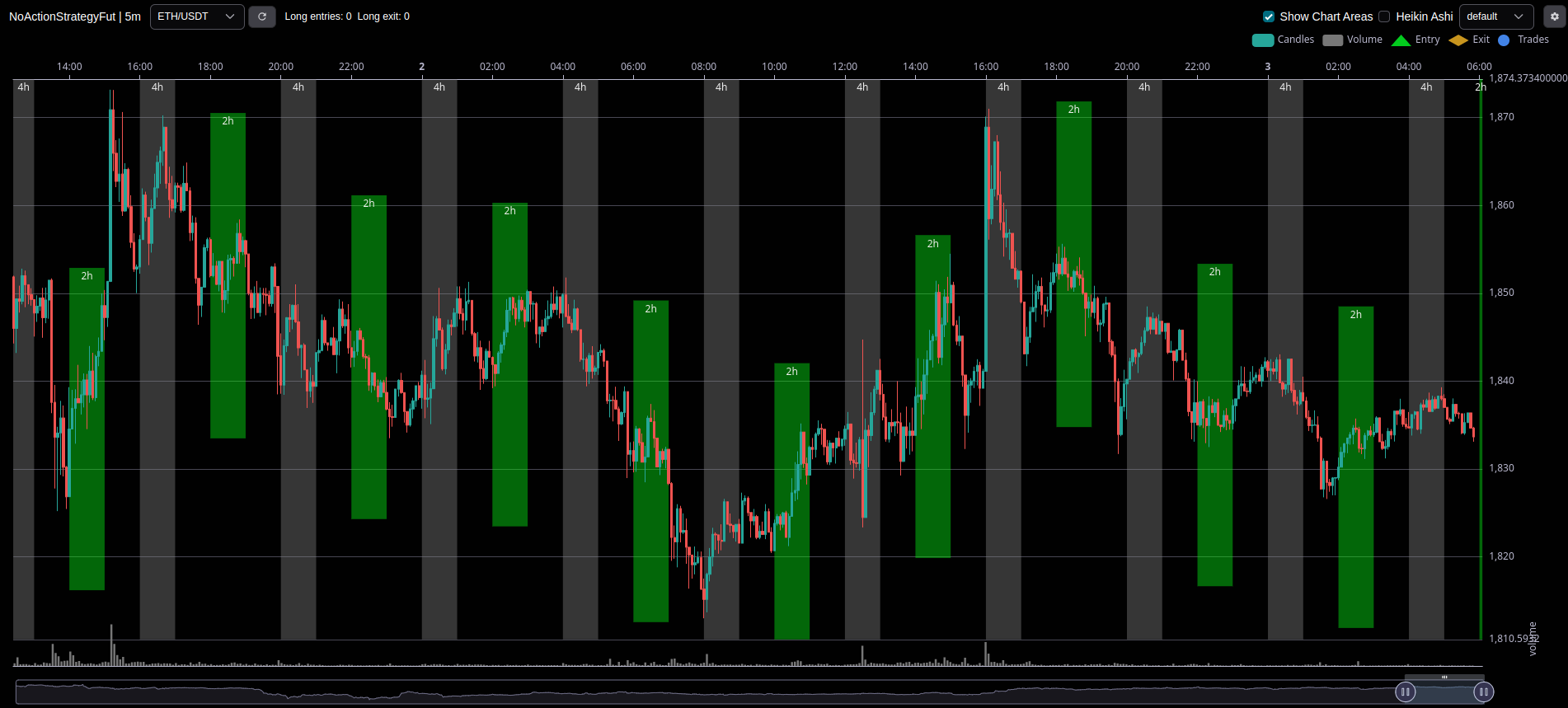
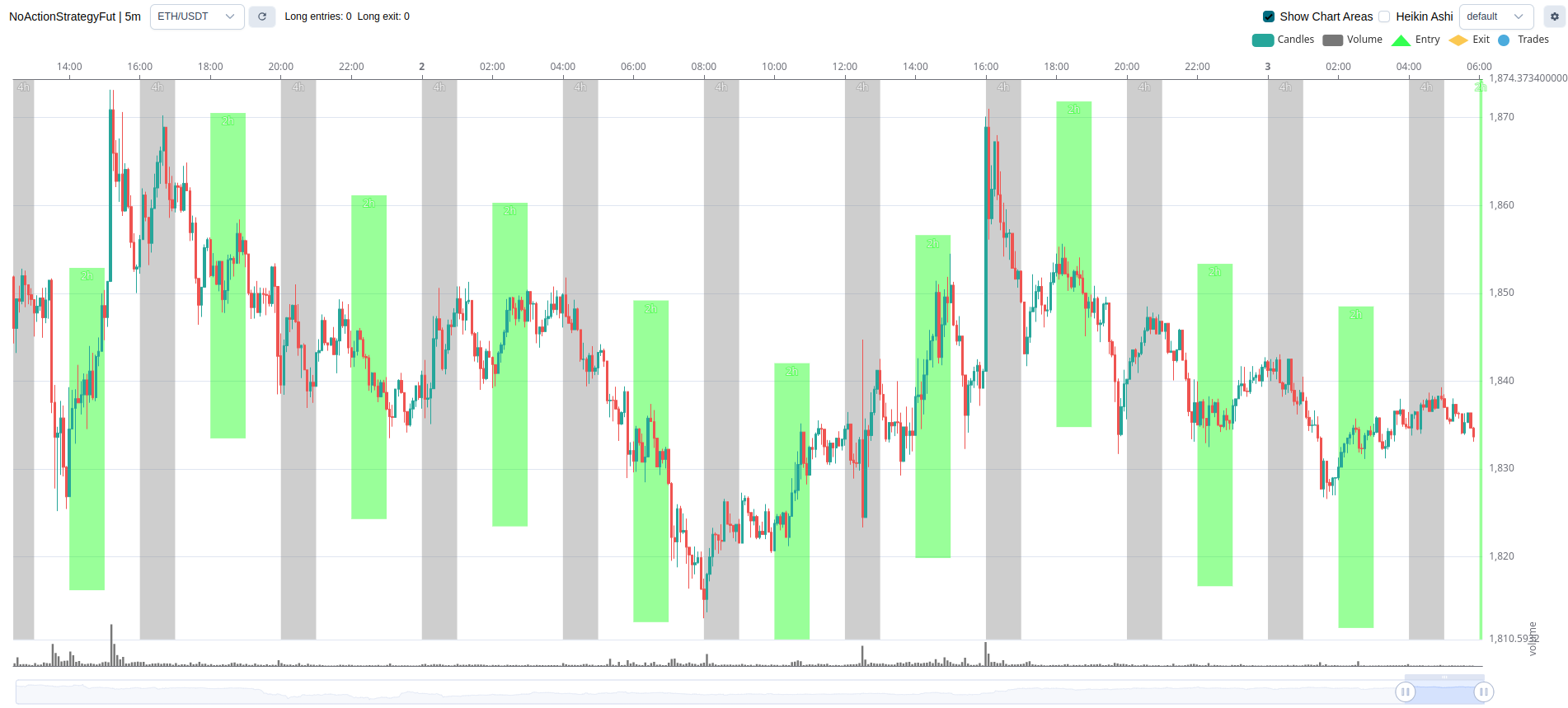
Code used for the plot above
这是一个示例代码,应作示例对待。
# Default imports

class AwesomeStrategy(IStrategy):
    def plot_annotations(
        self, pair: str, start_date: datetime, end_date: datetime, dataframe: DataFrame, **kwargs
    ) -> list[AnnotationType]:
        annotations = []
        while start_dt < end_date:
            start_dt += timedelta(hours=1)
            if (start_dt.hour % 4) == 0:
                mark_areas.append(
                    {
                        "type": "area",
                        "label": "4h",
                        "start": start_dt,
                        "end": start_dt + timedelta(hours=1),
                        "color": "rgba(133, 133, 133, 0.4)",
                    }
                )
            elif (start_dt.hour % 2) == 0:
            price = dataframe.loc[dataframe["date"] == start_dt, ["close"]].mean()
                mark_areas.append(
                    {
                        "type": "area",
                        "label": "2h",
                        "start": start_dt,
                        "end": start_dt + timedelta(hours=1),
                        "y_end": price * 1.01,
                        "y_start": price * 0.99,
                        "color": "rgba(0, 255, 0, 0.4)",
                        "z_level": 5,
                    }
                )

        return annotations