实用子命令
除了实盘交易和模拟运行模式、backtesting和hyperopt优化子命令,以及用于准备历史数据的download-data子命令外,该机器人还包含多个实用子命令。本节将对这些子命令进行说明。
创建用户目录
创建用于存放freqtrade相关文件的目录结构。
同时会生成策略和超参数优化示例文件,帮助您快速入门。
可多次使用 - 使用--reset参数会将示例策略和超参数优化文件重置为默认状态。
usage: freqtrade create-userdir [-h] [--userdir PATH] [--reset]

options:
  -h, --help            show this help message and exit
  --userdir PATH, --user-data-dir PATH
                        Path to userdata directory.
  --reset               Reset sample files to their original state.
Warning
使用--reset可能导致数据丢失,因为这会直接覆盖所有示例文件且不会再次确认。
├── backtest_results
├── data
├── hyperopt_results
├── hyperopts
│   ├── sample_hyperopt_loss.py
├── notebooks
│   └── strategy_analysis_example.ipynb
├── plot
└── strategies
    └── sample_strategy.py
创建新配置
创建新的配置文件,会询问一些对配置至关重要的选择性问题。
usage: freqtrade new-config [-h] [-c PATH]

options:
  -h, --help            show this help message and exit
  -c PATH, --config PATH
                        Specify configuration file (default:
                        `userdir/config.json` or `config.json` whichever
                        exists). Multiple --config options may be used. Can be
                        set to `-` to read config from stdin.
Warning
仅询问关键问题。Freqtrade提供了更多配置可能性,具体列表请参阅配置文档
创建配置示例
$ freqtrade new-config --config user_data/config_binance.json

? Do you want to enable Dry-run (simulated trades)?  Yes
? Please insert your stake currency: BTC
? Please insert your stake amount: 0.05
? Please insert max_open_trades (Integer or -1 for unlimited open trades): 3
? Please insert your desired timeframe (e.g. 5m): 5m
? Please insert your display Currency (for reporting): USD
? Select exchange  binance
? Do you want to enable Telegram?  No
显示配置
显示配置文件(默认已隐藏敏感值)。 在使用分离配置文件或环境变量时特别有用,此命令将显示合并后的配置。
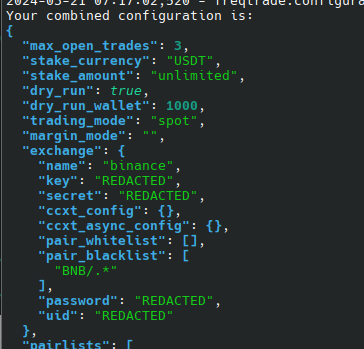
usage: freqtrade show-config [-h] [--userdir PATH] [-c PATH]
                             [--show-sensitive]

options:
  -h, --help            show this help message and exit
  --userdir PATH, --user-data-dir PATH
                        Path to userdata directory.
  -c PATH, --config PATH
                        Specify configuration file (default:
                        `userdir/config.json` or `config.json` whichever
                        exists). Multiple --config options may be used. Can be
                        set to `-` to read config from stdin.
  --show-sensitive      Show secrets in the output.
Your combined configuration is:
{
  "exit_pricing": {
    "price_side": "other",
    "use_order_book": true,
    "order_book_top": 1
  },
  "stake_currency": "USDT",
  "exchange": {
    "name": "binance",
    "key": "REDACTED",
    "secret": "REDACTED",
    "ccxt_config": {},
    "ccxt_async_config": {},
  }
  // ...
}
共享此命令提供的信息
我们尝试从默认输出(不使用 --show-sensitive 参数)中移除所有已知的敏感信息。
但请务必仔细检查输出中的敏感值,确保不会意外暴露任何私人信息。
创建新策略
基于类似 SampleStrategy 的模板创建新策略。 文件将根据您的类名命名,且不会覆盖现有文件。
结果文件将位于 user_data/strategies/<策略类名>.py。
usage: freqtrade new-strategy [-h] [--userdir PATH] [-s NAME]
                              [--strategy-path PATH]
                              [--template {full,minimal,advanced}]

options:
  -h, --help            show this help message and exit
  --userdir PATH, --user-data-dir PATH
                        Path to userdata directory.
  -s NAME, --strategy NAME
                        Specify strategy class name which will be used by the
                        bot.
  --strategy-path PATH  Specify additional strategy lookup path.
  --template {full,minimal,advanced}
                        Use a template which is either `minimal`, `full`
                        (containing multiple sample indicators) or `advanced`.
                        Default: `full`.
new-strategy 使用示例
freqtrade new-strategy --strategy AwesomeStrategy
使用自定义用户目录
freqtrade new-strategy --userdir ~/.freqtrade/ --strategy AwesomeStrategy
使用高级模板(填充所有可选函数和方法)
freqtrade new-strategy --strategy AwesomeStrategy --template advanced
列出策略
使用 list-strategies 子命令查看特定目录中的所有策略。
该子命令有助于发现环境中加载策略的问题:包含错误且加载失败的策略模块将以红色显示(加载失败),而具有重复名称的策略将以黄色显示(重复名称)。
usage: freqtrade list-strategies [-h] [-v] [--no-color] [--logfile FILE] [-V]
                                 [-c PATH] [-d PATH] [--userdir PATH]
                                 [--strategy-path PATH] [-1]
                                 [--recursive-strategy-search]

options:
  -h, --help            show this help message and exit
  --strategy-path PATH  Specify additional strategy lookup path.
  -1, --one-column      Print output in one column.
  --recursive-strategy-search
                        Recursively search for a strategy in the strategies
                        folder.

Common arguments:
  -v, --verbose         Verbose mode (-vv for more, -vvv to get all messages).
  --no-color            Disable colorization of hyperopt results. May be
                        useful if you are redirecting output to a file.
  --logfile FILE, --log-file FILE
                        Log to the file specified. Special values are:
                        'syslog', 'journald'. See the documentation for more
                        details.
  -V, --version         show program's version number and exit
  -c PATH, --config PATH
                        Specify configuration file (default:
                        `userdir/config.json` or `config.json` whichever
                        exists). Multiple --config options may be used. Can be
                        set to `-` to read config from stdin.
  -d PATH, --datadir PATH, --data-dir PATH
                        Path to the base directory of the exchange with
                        historical backtesting data. To see futures data, use
                        trading-mode additionally.
  --userdir PATH, --user-data-dir PATH
                        Path to userdata directory.
Warning
使用这些命令将尝试从目录加载所有 Python 文件。如果该目录中存在不受信任的文件,这可能存在安全风险,因为所有模块级代码都会被执行。
示例:搜索默认策略目录(位于默认用户目录内)。
freqtrade list-strategies
示例:搜索用户目录内的策略目录。
freqtrade list-strategies --userdir ~/.freqtrade/
示例:搜索专用策略路径。
freqtrade list-strategies --strategy-path ~/.freqtrade/strategies/
列出 Hyperopt 损失函数
使用 list-hyperoptloss 子命令查看所有可用的 hyperopt 损失函数。
它提供了环境中所有可用损失函数的快速列表。
该子命令有助于发现环境中加载损失函数的问题:包含错误且加载失败的 Hyperopt 损失函数模块将以红色显示(加载失败),而具有重复名称的 Hyperopt 损失函数将以黄色显示(重复名称)。
usage: freqtrade list-hyperoptloss [-h] [-v] [--no-color] [--logfile FILE]
                                   [-V] [-c PATH] [-d PATH] [--userdir PATH]
                                   [--hyperopt-path PATH] [-1]

options:
  -h, --help            show this help message and exit
  --hyperopt-path PATH  Specify additional lookup path for Hyperopt Loss
                        functions.
  -1, --one-column      Print output in one column.

Common arguments:
  -v, --verbose         Verbose mode (-vv for more, -vvv to get all messages).
  --no-color            Disable colorization of hyperopt results. May be
                        useful if you are redirecting output to a file.
  --logfile FILE, --log-file FILE
                        Log to the file specified. Special values are:
                        'syslog', 'journald'. See the documentation for more
                        details.
  -V, --version         show program's version number and exit
  -c PATH, --config PATH
                        Specify configuration file (default:
                        `userdir/config.json` or `config.json` whichever
                        exists). Multiple --config options may be used. Can be
                        set to `-` to read config from stdin.
  -d PATH, --datadir PATH, --data-dir PATH
                        Path to the base directory of the exchange with
                        historical backtesting data. To see futures data, use
                        trading-mode additionally.
  --userdir PATH, --user-data-dir PATH
                        Path to userdata directory.
列出 FreqAI 模型
使用 list-freqaimodels 子命令查看所有可用的 freqAI 模型。
该子命令对于排查环境中加载 FreqAI 模型的问题非常有用:包含错误且加载失败的模型模块会以红色显示(LOAD FAILED),而具有重复名称的模型则会以黄色显示(DUPLICATE NAME)。
usage: freqtrade list-freqaimodels [-h] [-v] [--no-color] [--logfile FILE]
                                   [-V] [-c PATH] [-d PATH] [--userdir PATH]
                                   [--freqaimodel-path PATH] [-1]

options:
  -h, --help            show this help message and exit
  --freqaimodel-path PATH
                        Specify additional lookup path for freqaimodels.
  -1, --one-column      Print output in one column.

Common arguments:
  -v, --verbose         Verbose mode (-vv for more, -vvv to get all messages).
  --no-color            Disable colorization of hyperopt results. May be
                        useful if you are redirecting output to a file.
  --logfile FILE, --log-file FILE
                        Log to the file specified. Special values are:
                        'syslog', 'journald'. See the documentation for more
                        details.
  -V, --version         show program's version number and exit
  -c PATH, --config PATH
                        Specify configuration file (default:
                        `userdir/config.json` or `config.json` whichever
                        exists). Multiple --config options may be used. Can be
                        set to `-` to read config from stdin.
  -d PATH, --datadir PATH, --data-dir PATH
                        Path to the base directory of the exchange with
                        historical backtesting data. To see futures data, use
                        trading-mode additionally.
  --userdir PATH, --user-data-dir PATH
                        Path to userdata directory.
列出交易所
使用 list-exchanges 子命令查看机器人可用的交易所。
usage: freqtrade list-exchanges [-h] [-v] [--no-color] [--logfile FILE] [-V]
                                [-c PATH] [-d PATH] [--userdir PATH] [-1] [-a]
                                [--trading-mode {spot,margin,futures}]
                                [--dex-exchanges]

options:
  -h, --help            show this help message and exit
  -1, --one-column      Print output in one column.
  -a, --all             Print all exchanges known to the ccxt library.
  --trading-mode {spot,margin,futures}, --tradingmode {spot,margin,futures}
                        Select Trading mode
  --dex-exchanges       Print only DEX exchanges.

Common arguments:
  -v, --verbose         Verbose mode (-vv for more, -vvv to get all messages).
  --no-color            Disable colorization of hyperopt results. May be
                        useful if you are redirecting output to a file.
  --logfile FILE, --log-file FILE
                        Log to the file specified. Special values are:
                        'syslog', 'journald'. See the documentation for more
                        details.
  -V, --version         show program's version number and exit
  -c PATH, --config PATH
                        Specify configuration file (default:
                        `userdir/config.json` or `config.json` whichever
                        exists). Multiple --config options may be used. Can be
                        set to `-` to read config from stdin.
  -d PATH, --datadir PATH, --data-dir PATH
                        Path to the base directory of the exchange with
                        historical backtesting data. To see futures data, use
                        trading-mode additionally.
  --userdir PATH, --user-data-dir PATH
                        Path to userdata directory.
示例:查看机器人可用的交易所:
$ freqtrade list-exchanges
Exchanges available for Freqtrade:
Exchange name       Supported    Markets                 Reason
------------------  -----------  ----------------------  ------------------------------------------------------------------------
binance             Official     spot, isolated futures
bitmart             Official     spot
bybit                            spot, isolated futures
gate                Official     spot, isolated futures
htx                 Official     spot
huobi                            spot
kraken              Official     spot
okx                 Official     spot, isolated futures
为清晰起见,输出已缩减 - 支持和可用的交易所可能随时间变化。
缺失选项的交易所
带有 "missing opt:" 标记的值可能需要特殊配置(例如,如果 fetchTickers 缺失则需使用订单簿)- 但理论上应该可以工作(尽管我们无法保证其稳定性)。
示例:查看 ccxt 库支持的所有交易所(包括'不良'交易所,即已知无法与 Freqtrade 配合使用的交易所)
$ freqtrade list-exchanges -a
All exchanges supported by the ccxt library:
Exchange name       Valid    Supported    Markets                 Reason
------------------  -------  -----------  ----------------------  ---------------------------------------------------------------------------------
binance             True     Official     spot, isolated futures
bitflyer            False                 spot                    missing: fetchOrder. missing opt: fetchTickers.
bitmart             True     Official     spot
bybit               True                  spot, isolated futures
gate                True     Official     spot, isolated futures
htx                 True     Official     spot
kraken              True     Official     spot
okx                 True     Official     spot, isolated futures
输出已缩减 - 支持和可用的交易所可能随时间变化。
列出时间框架
使用 list-timeframes 子命令查看交易所可用的时间框架列表。
usage: freqtrade list-timeframes [-h] [-v] [--no-color] [--logfile FILE] [-V]
                                 [-c PATH] [-d PATH] [--userdir PATH]
                                 [--exchange EXCHANGE] [-1]

options:
  -h, --help            show this help message and exit
  --exchange EXCHANGE   Exchange name. Only valid if no config is provided.
  -1, --one-column      Print output in one column.

Common arguments:
  -v, --verbose         Verbose mode (-vv for more, -vvv to get all messages).
  --no-color            Disable colorization of hyperopt results. May be
                        useful if you are redirecting output to a file.
  --logfile FILE, --log-file FILE
                        Log to the file specified. Special values are:
                        'syslog', 'journald'. See the documentation for more
                        details.
  -V, --version         show program's version number and exit
  -c PATH, --config PATH
                        Specify configuration file (default:
                        `userdir/config.json` or `config.json` whichever
                        exists). Multiple --config options may be used. Can be
                        set to `-` to read config from stdin.
  -d PATH, --datadir PATH, --data-dir PATH
                        Path to the base directory of the exchange with
                        historical backtesting data. To see futures data, use
                        trading-mode additionally.
  --userdir PATH, --user-data-dir PATH
                        Path to userdata directory.
- 示例:查看配置文件中设置的 'binance' 交易所的时间框架:
$ freqtrade list-timeframes -c config_binance.json
...
Timeframes available for the exchange `binance`: 1m, 3m, 5m, 15m, 30m, 1h, 2h, 4h, 6h, 8h, 12h, 1d, 3d, 1w, 1M
- 示例:枚举 Freqtrade 可用的交易所并打印每个交易所支持的时间框架:
$ for i in `freqtrade list-exchanges -1`; do freqtrade list-timeframes --exchange $i; done
列出交易对/市场列表
list-pairs 和 list-markets 子命令用于查看交易所上可用的交易对/市场。
交易对是指在市场符号中,基础货币部分和计价货币部分之间用 '/' 字符分隔的市场。 例如,在 'ETH/BTC' 交易对中,'ETH' 是基础货币,而 'BTC' 是计价货币。
对于 Freqtrade 交易的交易对,其计价货币由配置设置 stake_currency 的值定义。
您可以使用这些子命令打印任何交易对/市场的信息,并可以通过 --quote BTC 选项按计价货币过滤输出,或通过 --base ETH 选项按基础货币过滤输出。
这些子命令具有相同的用法和相同的可用选项集:
usage: freqtrade list-pairs [-h] [-v] [--no-color] [--logfile FILE] [-V]
                            [-c PATH] [-d PATH] [--userdir PATH]
                            [--exchange EXCHANGE] [--print-list]
                            [--print-json] [-1] [--print-csv]
                            [--base BASE_CURRENCY [BASE_CURRENCY ...]]
                            [--quote QUOTE_CURRENCY [QUOTE_CURRENCY ...]] [-a]
                            [--trading-mode {spot,margin,futures}]

options:
  -h, --help            show this help message and exit
  --exchange EXCHANGE   Exchange name. Only valid if no config is provided.
  --print-list          Print list of pairs or market symbols. By default data
                        is printed in the tabular format.
  --print-json          Print list of pairs or market symbols in JSON format.
  -1, --one-column      Print output in one column.
  --print-csv           Print exchange pair or market data in the csv format.
  --base BASE_CURRENCY [BASE_CURRENCY ...]
                        Specify base currency(-ies). Space-separated list.
  --quote QUOTE_CURRENCY [QUOTE_CURRENCY ...]
                        Specify quote currency(-ies). Space-separated list.
  -a, --all             Print all pairs or market symbols. By default only
                        active ones are shown.
  --trading-mode {spot,margin,futures}, --tradingmode {spot,margin,futures}
                        Select Trading mode

Common arguments:
  -v, --verbose         Verbose mode (-vv for more, -vvv to get all messages).
  --no-color            Disable colorization of hyperopt results. May be
                        useful if you are redirecting output to a file.
  --logfile FILE, --log-file FILE
                        Log to the file specified. Special values are:
                        'syslog', 'journald'. See the documentation for more
                        details.
  -V, --version         show program's version number and exit
  -c PATH, --config PATH
                        Specify configuration file (default:
                        `userdir/config.json` or `config.json` whichever
                        exists). Multiple --config options may be used. Can be
                        set to `-` to read config from stdin.
  -d PATH, --datadir PATH, --data-dir PATH
                        Path to the base directory of the exchange with
                        historical backtesting data. To see futures data, use
                        trading-mode additionally.
  --userdir PATH, --user-data-dir PATH
                        Path to userdata directory.
默认情况下,仅显示活跃的交易对/市场。活跃的交易对/市场是当前可以在交易所进行交易的。
您可以使用 -a/-all 选项查看所有交易对/市场的列表,包括非活跃的。
如果市场的最小可交易价格非常小,即小于 1e-11 (0.00000000001),交易对可能被列为不可交易。
在打印输出中,交易对/市场按其符号字符串排序。
示例
- 以 JSON 格式打印默认配置文件(即 "Binance" 交易所)中计价货币为 USD 的活跃交易对列表:
$ freqtrade list-pairs --quote USD --print-json
- 打印交易所中所有交易对的列表,该列表在
config_binance.json配置文件中指定(即在 "Binance" 交易所上),基础货币为 BTC 或 ETH,报价货币为 USDT 或 USD,以带摘要的人类可读列表形式呈现:
$ freqtrade list-pairs -c config_binance.json --all --base BTC ETH --quote USDT USD --print-list
- 以表格格式打印 "Kraken" 交易所上的所有市场:
$ freqtrade list-markets --exchange kraken --all
测试交易对列表
使用 test-pairlist 子命令来测试动态交易对列表的配置。
需要配置中指定了 pairlists 属性。
可用于生成在回测/超参数优化期间使用的静态交易对列表。
usage: freqtrade test-pairlist [-h] [--userdir PATH] [-v] [-c PATH]
                               [--quote QUOTE_CURRENCY [QUOTE_CURRENCY ...]]
                               [-1] [--print-json] [--exchange EXCHANGE]

options:
  -h, --help            show this help message and exit
  --userdir PATH, --user-data-dir PATH
                        Path to userdata directory.
  -v, --verbose         Verbose mode (-vv for more, -vvv to get all messages).
  -c PATH, --config PATH
                        Specify configuration file (default:
                        `userdir/config.json` or `config.json` whichever
                        exists). Multiple --config options may be used. Can be
                        set to `-` to read config from stdin.
  --quote QUOTE_CURRENCY [QUOTE_CURRENCY ...]
                        Specify quote currency(-ies). Space-separated list.
  -1, --one-column      Print output in one column.
  --print-json          Print list of pairs or market symbols in JSON format.
  --exchange EXCHANGE   Exchange name. Only valid if no config is provided.
示例
显示使用动态交易对列表时的白名单。
freqtrade test-pairlist --config config.json --quote USDT BTC
转换数据库
freqtrade convert-db 可用于将数据库从一个系统转换到另一个系统(sqlite -> postgres, postgres -> 其他 postgres),迁移所有交易、订单和交易对锁定。
请参阅相应文档了解不同数据库系统的要求。
usage: freqtrade convert-db [-h] [--db-url PATH] [--db-url-from PATH]

options:
  -h, --help          show this help message and exit
  --db-url PATH       Override trades database URL, this is useful in custom
                      deployments (default: `sqlite:///tradesv3.sqlite` for
                      Live Run mode, `sqlite:///tradesv3.dryrun.sqlite` for
                      Dry Run).
  --db-url-from PATH  Source db url to use when migrating a database.
Warning
请确保仅在空的目标数据库上使用此功能。Freqtrade 将执行常规迁移,但如果条目已存在,可能会失败。
网页服务器模式
Experimental
Webserver 模式是一种实验性模式,旨在提高回测和策略开发效率。 该模式可能仍存在错误——如果您遇到任何问题,请通过 GitHub issue 报告,谢谢。
以 webserver 模式运行 freqtrade。 Freqtrade 将启动 webserver 并允许 FreqUI 启动和控制回测进程。 这样做的好处是数据在多次回测运行之间无需重新加载(只要时间框架和时间范围保持不变)。 FreqUI 还将显示回测结果。
usage: freqtrade webserver [-h] [-v] [--no-color] [--logfile FILE] [-V]
                           [-c PATH] [-d PATH] [--userdir PATH]

options:
  -h, --help            show this help message and exit

Common arguments:
  -v, --verbose         Verbose mode (-vv for more, -vvv to get all messages).
  --no-color            Disable colorization of hyperopt results. May be
                        useful if you are redirecting output to a file.
  --logfile FILE, --log-file FILE
                        Log to the file specified. Special values are:
                        'syslog', 'journald'. See the documentation for more
                        details.
  -V, --version         show program's version number and exit
  -c PATH, --config PATH
                        Specify configuration file (default:
                        `userdir/config.json` or `config.json` whichever
                        exists). Multiple --config options may be used. Can be
                        set to `-` to read config from stdin.
  -d PATH, --datadir PATH, --data-dir PATH
                        Path to the base directory of the exchange with
                        historical backtesting data. To see futures data, use
                        trading-mode additionally.
  --userdir PATH, --user-data-dir PATH
                        Path to userdata directory.
Webserver 模式 - docker
您也可以通过 docker 使用 webserver 模式。
启动一次性容器需要显式配置端口,因为默认情况下端口不会暴露。
您可以使用 docker compose run --rm -p 127.0.0.1:8080:8080 freqtrade webserver 启动一个一次性容器,该容器将在您停止时被移除。这假设端口 8080 仍然可用,并且没有其他机器人正在该端口上运行。
或者,您可以重新配置 docker-compose 文件以更新命令:
    command: >
      webserver
      --config /freqtrade/user_data/config.json
现在您可以使用 docker compose up 启动 webserver。
这假设配置已启用 webserver 并为 docker 进行了配置(监听端口 = 0.0.0.0)。
Tip
如果您想启动实盘或模拟交易机器人,请不要忘记将命令重置为交易命令。
显示历史回测结果
允许您显示历史回测结果。
添加 --show-pair-list 参数可输出排序后的交易对列表,便于直接复制/粘贴到配置中(自动剔除表现不佳的交易对)。
策略过拟合风险
仅使用盈利交易对可能导致策略过拟合,在未来数据上表现不佳。请务必在实盘前通过模拟交易进行全面测试。
usage: freqtrade backtesting-show [-h] [-v] [--no-color] [--logfile FILE] [-V]
                                  [-c PATH] [-d PATH] [--userdir PATH]
                                  [--backtest-filename PATH]
                                  [--backtest-directory PATH]
                                  [--show-pair-list]
                                  [--breakdown {day,week,month,year} [{day,week,month,year} ...]]

options:
  -h, --help            show this help message and exit
  --backtest-filename PATH, --export-filename PATH
                        Use this filename for backtest results.Example:
                        `--backtest-
                        filename=backtest_results_2020-09-27_16-20-48.json`.
                        Assumes either `user_data/backtest_results/` or
                        `--export-directory` as base directory.
  --backtest-directory PATH, --export-directory PATH
                        Directory to use for backtest results. Example:
                        `--export-directory=user_data/backtest_results/`.
  --show-pair-list      Show backtesting pairlist sorted by profit.
  --breakdown {day,week,month,year} [{day,week,month,year} ...]
                        Show backtesting breakdown per [day, week, month,
                        year].

Common arguments:
  -v, --verbose         Verbose mode (-vv for more, -vvv to get all messages).
  --no-color            Disable colorization of hyperopt results. May be
                        useful if you are redirecting output to a file.
  --logfile FILE, --log-file FILE
                        Log to the file specified. Special values are:
                        'syslog', 'journald'. See the documentation for more
                        details.
  -V, --version         show program's version number and exit
  -c PATH, --config PATH
                        Specify configuration file (default:
                        `userdir/config.json` or `config.json` whichever
                        exists). Multiple --config options may be used. Can be
                        set to `-` to read config from stdin.
  -d PATH, --datadir PATH, --data-dir PATH
                        Path to the base directory of the exchange with
                        historical backtesting data. To see futures data, use
                        trading-mode additionally.
  --userdir PATH, --user-data-dir PATH
                        Path to userdata directory.
详细回测分析
高级回测结果分析功能。
更多细节请参阅回测分析章节。
usage: freqtrade backtesting-analysis [-h] [-v] [--no-color] [--logfile FILE]
                                      [-V] [-c PATH] [-d PATH]
                                      [--userdir PATH]
                                      [--backtest-filename PATH]
                                      [--backtest-directory PATH]
                                      [--analysis-groups {0,1,2,3,4,5} [{0,1,2,3,4,5} ...]]
                                      [--enter-reason-list ENTER_REASON_LIST [ENTER_REASON_LIST ...]]
                                      [--exit-reason-list EXIT_REASON_LIST [EXIT_REASON_LIST ...]]
                                      [--indicator-list INDICATOR_LIST [INDICATOR_LIST ...]]
                                      [--entry-only] [--exit-only]
                                      [--timerange TIMERANGE]
                                      [--rejected-signals] [--analysis-to-csv]
                                      [--analysis-csv-path ANALYSIS_CSV_PATH]

options:
  -h, --help            show this help message and exit
  --backtest-filename PATH, --export-filename PATH
                        Use this filename for backtest results.Example:
                        `--backtest-
                        filename=backtest_results_2020-09-27_16-20-48.json`.
                        Assumes either `user_data/backtest_results/` or
                        `--export-directory` as base directory.
  --backtest-directory PATH, --export-directory PATH
                        Directory to use for backtest results. Example:
                        `--export-directory=user_data/backtest_results/`.
  --analysis-groups {0,1,2,3,4,5} [{0,1,2,3,4,5} ...]
                        grouping output - 0: simple wins/losses by enter tag,
                        1: by enter_tag, 2: by enter_tag and exit_tag, 3: by
                        pair and enter_tag, 4: by pair, enter_ and exit_tag
                        (this can get quite large), 5: by exit_tag
  --enter-reason-list ENTER_REASON_LIST [ENTER_REASON_LIST ...]
                        Space separated list of entry signals to analyse.
                        Default: all. e.g. 'entry_tag_a entry_tag_b'
  --exit-reason-list EXIT_REASON_LIST [EXIT_REASON_LIST ...]
                        Space separated list of exit signals to analyse.
                        Default: all. e.g. 'exit_tag_a roi stop_loss
                        trailing_stop_loss'
  --indicator-list INDICATOR_LIST [INDICATOR_LIST ...]
                        Space separated list of indicators to analyse. e.g.
                        'close rsi bb_lowerband profit_abs'
  --entry-only          Only analyze entry signals.
  --exit-only           Only analyze exit signals.
  --timerange TIMERANGE
                        Specify what timerange of data to use.
  --rejected-signals    Analyse rejected signals
  --analysis-to-csv     Save selected analysis tables to individual CSVs
  --analysis-csv-path ANALYSIS_CSV_PATH
                        Specify a path to save the analysis CSVs if
                        --analysis-to-csv is enabled. Default:
                        user_data/basktesting_results/

Common arguments:
  -v, --verbose         Verbose mode (-vv for more, -vvv to get all messages).
  --no-color            Disable colorization of hyperopt results. May be
                        useful if you are redirecting output to a file.
  --logfile FILE, --log-file FILE
                        Log to the file specified. Special values are:
                        'syslog', 'journald'. See the documentation for more
                        details.
  -V, --version         show program's version number and exit
  -c PATH, --config PATH
                        Specify configuration file (default:
                        `userdir/config.json` or `config.json` whichever
                        exists). Multiple --config options may be used. Can be
                        set to `-` to read config from stdin.
  -d PATH, --datadir PATH, --data-dir PATH
                        Path to the base directory of the exchange with
                        historical backtesting data. To see futures data, use
                        trading-mode additionally.
  --userdir PATH, --user-data-dir PATH
                        Path to userdata directory.
列出超参数优化结果
您可以使用 hyperopt-list 子命令查看 Hyperopt 模块先前评估过的超参数优化周期。
usage: freqtrade hyperopt-list [-h] [-v] [--no-color] [--logfile FILE] [-V]
                               [-c PATH] [-d PATH] [--userdir PATH] [--best]
                               [--profitable] [--min-trades INT]
                               [--max-trades INT] [--min-avg-time FLOAT]
                               [--max-avg-time FLOAT] [--min-avg-profit FLOAT]
                               [--max-avg-profit FLOAT]
                               [--min-total-profit FLOAT]
                               [--max-total-profit FLOAT]
                               [--min-objective FLOAT] [--max-objective FLOAT]
                               [--print-json] [--no-details]
                               [--hyperopt-filename FILENAME]
                               [--export-csv FILE]

options:
  -h, --help            show this help message and exit
  --best                Select only best epochs.
  --profitable          Select only profitable epochs.
  --min-trades INT      Select epochs with more than INT trades.
  --max-trades INT      Select epochs with less than INT trades.
  --min-avg-time FLOAT  Select epochs above average time.
  --max-avg-time FLOAT  Select epochs below average time.
  --min-avg-profit FLOAT
                        Select epochs above average profit.
  --max-avg-profit FLOAT
                        Select epochs below average profit.
  --min-total-profit FLOAT
                        Select epochs above total profit.
  --max-total-profit FLOAT
                        Select epochs below total profit.
  --min-objective FLOAT
                        Select epochs above objective.
  --max-objective FLOAT
                        Select epochs below objective.
  --print-json          Print output in JSON format.
  --no-details          Do not print best epoch details.
  --hyperopt-filename FILENAME
                        Hyperopt result filename.Example: `--hyperopt-
                        filename=hyperopt_results_2020-09-27_16-20-48.pickle`
  --export-csv FILE     Export to CSV-File. This will disable table print.
                        Example: --export-csv hyperopt.csv

Common arguments:
  -v, --verbose         Verbose mode (-vv for more, -vvv to get all messages).
  --no-color            Disable colorization of hyperopt results. May be
                        useful if you are redirecting output to a file.
  --logfile FILE, --log-file FILE
                        Log to the file specified. Special values are:
                        'syslog', 'journald'. See the documentation for more
                        details.
  -V, --version         show program's version number and exit
  -c PATH, --config PATH
                        Specify configuration file (default:
                        `userdir/config.json` or `config.json` whichever
                        exists). Multiple --config options may be used. Can be
                        set to `-` to read config from stdin.
  -d PATH, --datadir PATH, --data-dir PATH
                        Path to the base directory of the exchange with
                        historical backtesting data. To see futures data, use
                        trading-mode additionally.
  --userdir PATH, --user-data-dir PATH
                        Path to userdata directory.
Note
hyperopt-list 会自动使用最新的超参数优化结果文件。
可通过 --hyperopt-filename 参数指定其他可用文件名(无需路径!)来覆盖此默认行为。
示例
列出所有结果并在末尾显示最佳结果的详细信息:
freqtrade hyperopt-list
仅列出盈利周期。不显示最佳周期的详细信息,便于脚本迭代处理:
freqtrade hyperopt-list --profitable --no-details
查看 Hyperopt 结果详情
您可以使用 hyperopt-show 子命令显示 Hyperopt 模块先前评估的任何超优化周期的详细信息。
usage: freqtrade hyperopt-show [-h] [-v] [--no-color] [--logfile FILE] [-V]
                               [-c PATH] [-d PATH] [--userdir PATH] [--best]
                               [--profitable] [-n INT] [--print-json]
                               [--hyperopt-filename FILENAME] [--no-header]
                               [--disable-param-export]
                               [--breakdown {day,week,month,year} [{day,week,month,year} ...]]

options:
  -h, --help            show this help message and exit
  --best                Select only best epochs.
  --profitable          Select only profitable epochs.
  -n INT, --index INT   Specify the index of the epoch to print details for.
  --print-json          Print output in JSON format.
  --hyperopt-filename FILENAME
                        Hyperopt result filename.Example: `--hyperopt-
                        filename=hyperopt_results_2020-09-27_16-20-48.pickle`
  --no-header           Do not print epoch details header.
  --disable-param-export
                        Disable automatic hyperopt parameter export.
  --breakdown {day,week,month,year} [{day,week,month,year} ...]
                        Show backtesting breakdown per [day, week, month,
                        year].

Common arguments:
  -v, --verbose         Verbose mode (-vv for more, -vvv to get all messages).
  --no-color            Disable colorization of hyperopt results. May be
                        useful if you are redirecting output to a file.
  --logfile FILE, --log-file FILE
                        Log to the file specified. Special values are:
                        'syslog', 'journald'. See the documentation for more
                        details.
  -V, --version         show program's version number and exit
  -c PATH, --config PATH
                        Specify configuration file (default:
                        `userdir/config.json` or `config.json` whichever
                        exists). Multiple --config options may be used. Can be
                        set to `-` to read config from stdin.
  -d PATH, --datadir PATH, --data-dir PATH
                        Path to the base directory of the exchange with
                        historical backtesting data. To see futures data, use
                        trading-mode additionally.
  --userdir PATH, --user-data-dir PATH
                        Path to userdata directory.
Note
hyperopt-show 将自动使用最新的可用超优化结果文件。
您可以使用 --hyperopt-filename 参数覆盖此行为,并指定另一个可用文件名(不带路径!)。
示例
打印周期 168 的详细信息(周期编号由 hyperopt-list 子命令或 Hyperopt 在超优化运行期间显示):
freqtrade hyperopt-show -n 168
打印包含最后一个最佳周期(即所有周期中的最佳周期)详细信息的 JSON 数据:
freqtrade hyperopt-show --best -n -1 --print-json --no-header
显示交易
将数据库中选择的(或全部)交易打印到屏幕。
usage: freqtrade show-trades [-h] [-v] [--no-color] [--logfile FILE] [-V]
                             [-c PATH] [-d PATH] [--userdir PATH]
                             [--db-url PATH]
                             [--trade-ids TRADE_IDS [TRADE_IDS ...]]
                             [--print-json]

options:
  -h, --help            show this help message and exit
  --db-url PATH         Override trades database URL, this is useful in custom
                        deployments (default: `sqlite:///tradesv3.sqlite` for
                        Live Run mode, `sqlite:///tradesv3.dryrun.sqlite` for
                        Dry Run).
  --trade-ids TRADE_IDS [TRADE_IDS ...]
                        Specify the list of trade ids.
  --print-json          Print output in JSON format.

Common arguments:
  -v, --verbose         Verbose mode (-vv for more, -vvv to get all messages).
  --no-color            Disable colorization of hyperopt results. May be
                        useful if you are redirecting output to a file.
  --logfile FILE, --log-file FILE
                        Log to the file specified. Special values are:
                        'syslog', 'journald'. See the documentation for more
                        details.
  -V, --version         show program's version number and exit
  -c PATH, --config PATH
                        Specify configuration file (default:
                        `userdir/config.json` or `config.json` whichever
                        exists). Multiple --config options may be used. Can be
                        set to `-` to read config from stdin.
  -d PATH, --datadir PATH, --data-dir PATH
                        Path to the base directory of the exchange with
                        historical backtesting data. To see futures data, use
                        trading-mode additionally.
  --userdir PATH, --user-data-dir PATH
                        Path to userdata directory.
示例
以 JSON 格式打印 ID 为 2 和 3 的交易
freqtrade show-trades --db-url sqlite:///tradesv3.sqlite --trade-ids 2 3 --print-json
策略更新器
更新列出的策略或策略文件夹内的所有策略以符合 v3 规范。
如果命令在没有 --strategy-list 参数的情况下运行,则策略文件夹内的所有策略都将被转换。
您的原始策略将保留在 user_data/strategies_orig_updater/ 目录中。
转换结果
策略更新器将采用"尽力而为"的方法。请进行尽职调查并验证转换结果。
我们还建议运行 Python 格式化工具(例如 black)以合理的方式格式化结果。
usage: freqtrade strategy-updater [-h] [-v] [--no-color] [--logfile FILE] [-V]
                                  [-c PATH] [-d PATH] [--userdir PATH]
                                  [--strategy-list STRATEGY_LIST [STRATEGY_LIST ...]]
                                  [--strategy-path PATH]
                                  [--recursive-strategy-search]

options:
  -h, --help            show this help message and exit
  --strategy-list STRATEGY_LIST [STRATEGY_LIST ...]
                        Provide a space-separated list of strategies to
                        backtest. Please note that timeframe needs to be set
                        either in config or via command line. When using this
                        together with `--export trades`, the strategy-name is
                        injected into the filename (so `backtest-data.json`
                        becomes `backtest-data-SampleStrategy.json`
  --strategy-path PATH  Specify additional strategy lookup path.
  --recursive-strategy-search
                        Recursively search for a strategy in the strategies
                        folder.

Common arguments:
  -v, --verbose         Verbose mode (-vv for more, -vvv to get all messages).
  --no-color            Disable colorization of hyperopt results. May be
                        useful if you are redirecting output to a file.
  --logfile FILE, --log-file FILE
                        Log to the file specified. Special values are:
                        'syslog', 'journald'. See the documentation for more
                        details.
  -V, --version         show program's version number and exit
  -c PATH, --config PATH
                        Specify configuration file (default:
                        `userdir/config.json` or `config.json` whichever
                        exists). Multiple --config options may be used. Can be
                        set to `-` to read config from stdin.
  -d PATH, --datadir PATH, --data-dir PATH
                        Path to the base directory of the exchange with
                        historical backtesting data. To see futures data, use
                        trading-mode additionally.
  --userdir PATH, --user-data-dir PATH
                        Path to userdata directory.