Webhook 使用指南
配置
通过向配置文件中添加 webhook 配置段,并将 webhook.enabled 设置为 true 来启用 webhook 功能。
示例配置(使用 IFTTT 测试)。
  "webhook": {
        "enabled": true,
        "url": "https://maker.ifttt.com/trigger/<YOUREVENT>/with/key/<YOURKEY>/",
        "entry": {
            "value1": "Buying {pair}",
            "value2": "limit {limit:8f}",
            "value3": "{stake_amount:8f} {stake_currency}"
        },
        "entry_cancel": {
            "value1": "Cancelling Open Buy Order for {pair}",
            "value2": "limit {limit:8f}",
            "value3": "{stake_amount:8f} {stake_currency}"
        },
         "entry_fill": {
            "value1": "Buy Order for {pair} filled",
            "value2": "at {open_rate:8f}",
            "value3": ""
        },
        "exit": {
            "value1": "Exiting {pair}",
            "value2": "limit {limit:8f}",
            "value3": "profit: {profit_amount:8f} {stake_currency} ({profit_ratio})"
        },
        "exit_cancel": {
            "value1": "Cancelling Open Exit Order for {pair}",
            "value2": "limit {limit:8f}",
            "value3": "profit: {profit_amount:8f} {stake_currency} ({profit_ratio})"
        },
        "exit_fill": {
            "value1": "Exit Order for {pair} filled",
            "value2": "at {close_rate:8f}.",
            "value3": ""
        },
        "status": {
            "value1": "Status: {status}",
            "value2": "",
            "value3": ""
        }
    },
webhook.url 中的 URL 应指向您的 webhook 正确地址。如果您使用 IFTTT(如上例所示),请将您的事件和密钥插入到 URL 中。
您可以将 POST 请求体格式设置为表单编码(默认)、JSON 编码或原始数据。分别使用 "format": "form"、"format": "json" 或 "format": "raw"。Mattermost Cloud 集成的示例配置:
  "webhook": {
        "enabled": true,
        "url": "https://<YOURSUBDOMAIN>.cloud.mattermost.com/hooks/<YOURHOOK>",
        "format": "json",
        "status": {
            "text": "Status: {status}"
        }
    },
这将生成一个 POST 请求,例如包含 {"text":"Status: running"} 请求体和 Content-Type: application/json 头部,最终在 Mattermost 频道中显示 Status: running 消息。
使用表单编码或 JSON 编码配置时,您可以配置任意数量的载荷值,键和值都会输出到 POST 请求中。但使用原始数据格式时,只能配置一个值,且必须命名为 "data"。这种情况下,POST 请求中只会输出值而不包含数据键。例如:
  "webhook": {
        "enabled": true,
        "url": "https://<YOURHOOKURL>",
        "format": "raw",
        "webhookstatus": {
            "data": "Status: {status}"
        }
    },
这将生成一个 POST 请求,例如包含 Status: running 请求体和 Content-Type: text/plain 头部。
嵌套 Webhook 配置
某些 webhook 目标需要嵌套结构。 这可以通过将内容设置为字典或列表而非直接文本实现。
此功能仅支持 JSON 格式。
"webhook": {
    "enabled": true,
    "url": "https://<yourhookurl>",
    "format": "json",
    "status": {
        "msgtype": "text",
        "text": {
            "content": "Status update: {status}"
        }
    }
}
执行结果将生成一个 POST 请求,其请求体示例为 {"msgtype":"text","text":{"content":"状态更新:运行中"}},并附带 Content-Type: application/json 头部。
附加配置
可通过 webhook.retries 参数设置 webhook 请求失败时(即 HTTP 响应状态码非 200)的最大重试次数。默认值为 0 表示禁用重试。还可通过 webhook.retry_delay 参数设置重试间隔时间(单位:秒),默认值为 0.1(即 100 毫秒)。请注意,若 webhook 存在连接问题,增加重试次数或延迟时间可能会降低交易运行速度。
您还可指定 webhook.timeout 参数——用于定义机器人判定目标主机无响应前的等待时长(默认为 10 秒)。
重试配置示例:
  "webhook": {
        "enabled": true,
        "url": "https://<YOURHOOKURL>",
        "timeout": 10,
        "retries": 3,
        "retry_delay": 0.2,
        "status": {
            "status": "Status: {status}"
        }
    },
可通过策略中的 self.dp.send_msg() 函数向 Webhook 端点发送自定义消息。需将 allow_custom_messages 选项设置为 true 启用此功能:
  "webhook": {
        "enabled": true,
        "url": "https://<YOURHOOKURL>",
        "allow_custom_messages": true,
        "strategy_msg": {
            "status": "StrategyMessage: {msg}"
        }
    },
可以为不同事件配置不同的载荷。并非所有字段都是必需的,但您应至少配置其中一个字典,否则 Webhook 将永远不会被调用。
Webhook 消息类型
入场 / 入场成交
当机器人下多/空单以增加仓位时,或在该订单成交时,将填充 webhook.entry 和 webhook.entry_fill 中的字段。参数使用 string.format 进行填充。
可能的参数包括:
trade_idexchangepairdirectionleveragelimit# 已弃用 - 不应再使用。open_rateamountopen_datestake_amountstake_currencybase_currencyquote_currencyfiat_currencyorder_typecurrent_rateenter_tag
入场取消
当机器人取消多/空订单时,将填充 webhook.entry_cancel 中的字段。参数使用 string.format 进行填充。
可能的参数包括:
trade_idexchangepairdirectionleveragelimitamountopen_datestake_amountstake_currencybase_currencyquote_currencyfiat_currencyorder_typecurrent_rateenter_tag
离场 / 离场成交
当机器人下离场订单时,或在该离场订单成交时,将填充 webhook.exit 和 webhook.exit_fill 中的字段。参数使用 string.format 进行填充。
可能的参数包括:
trade_idexchangepairdirectionleveragegainamountopen_rateclose_ratecurrent_rateprofit_amountprofit_ratiostake_currencybase_currencyquote_currencyfiat_currencyenter_tagexit_reasonorder_typeopen_dateclose_datesub_tradeis_final_exit
退出取消
当机器人取消退出订单时,webhook.exit_cancel 中的字段会被填充。参数使用 string.format 进行填充。
可能的参数包括:
trade_idexchangepairdirectionleveragegainorder_rateamountopen_ratecurrent_rateprofit_amountprofit_ratiostake_currencybase_currencyquote_currencyfiat_currencyexit_reasonorder_typeopen_dateclose_date
状态
webhook.status 中的字段用于常规状态消息(已启动 / 已停止 / ...)。参数使用 string.format 进行填充。
此处唯一可能的值是 {status}。
Discord
Discord 可使用特殊形式的 webhook。 可按如下方式配置:
"discord": {
    "enabled": true,
    "webhook_url": "https://discord.com/api/webhooks/<Your webhook URL ...>",
    "exit_fill": [
        {"Trade ID": "{trade_id}"},
        {"Exchange": "{exchange}"},
        {"Pair": "{pair}"},
        {"Direction": "{direction}"},
        {"Open rate": "{open_rate}"},
        {"Close rate": "{close_rate}"},
        {"Amount": "{amount}"},
        {"Open date": "{open_date:%Y-%m-%d %H:%M:%S}"},
        {"Close date": "{close_date:%Y-%m-%d %H:%M:%S}"},
        {"Profit": "{profit_amount} {stake_currency}"},
        {"Profitability": "{profit_ratio:.2%}"},
        {"Enter tag": "{enter_tag}"},
        {"Exit Reason": "{exit_reason}"},
        {"Strategy": "{strategy}"},
        {"Timeframe": "{timeframe}"},
    ],
    "entry_fill": [
        {"Trade ID": "{trade_id}"},
        {"Exchange": "{exchange}"},
        {"Pair": "{pair}"},
        {"Direction": "{direction}"},
        {"Open rate": "{open_rate}"},
        {"Amount": "{amount}"},
        {"Open date": "{open_date:%Y-%m-%d %H:%M:%S}"},
        {"Enter tag": "{enter_tag}"},
        {"Strategy": "{strategy} {timeframe}"},
    ]
}
以上表示默认配置(exit_fill 和 entry_fill 为可选,将默认使用上述配置)——显然可以进行修改。
若要禁用两个默认值中的任意一个(entry_fill / exit_fill),可为其分配空数组(exit_fill: [])。
可用字段对应于 webhook 的字段,并在相应的 webhook 章节中有详细说明。
默认情况下,通知将如下所示。
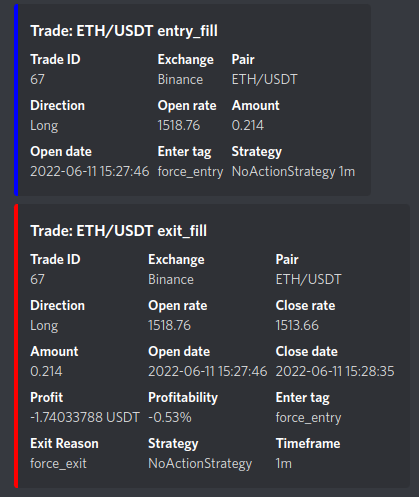
可以通过 dataprovider.send_msg() 函数从策略向 Discord 端点发送自定义消息。要启用此功能,请将 allow_custom_messages 选项设置为 true:
  "discord": {
        "enabled": true,
        "webhook_url": "https://discord.com/api/webhooks/<Your webhook URL ...>",
        "allow_custom_messages": true,
    },